
Trigs
The trig view is the default view for every sequencer. It is the central editing surface: here you write which steps fire, set percentage chance, configure conditional and sustain trigs, and set per-row play modes.
What you see
The grid is 8 rows × 16 steps. Each Launchpad shows half the grid:
- LHS LP (LP1 for P1, LP3 for P2): columns 1–8 = steps 1–8. Column 9 (rightmost LP button on each row) = row mode toggle.
- RHS LP (LP2 for P1, LP4 for P2): columns 1–8 = steps 9–16.
Rows are numbered 1 at the bottom of the pad up to 8 at the top. The manual counts them that way everywhere, so row 1 is always the bottom row you are looking at, whichever view you are in.
The trig view is per-sequencer: selecting a different sequencer (top-bar buttons) switches your own two pads to that sequencer’s trig grid. The other player’s pads do not move, and nothing you hear changes: selection decides what you are looking at and editing, not what plays.
Trig status colours
Each step in the grid shows one of the following states:
| Status | Colour | Code | Description |
|---|---|---|---|
| OFF | Colour Unlit | Code 0 | Description Step is silent |
| ON | Colour Teal-green | Code 1 | Description Step fires unconditionally on every pass |
| PERCENTAGE_CHANCE | Colour Green (4 shades) | Code 2 | Description Fires at a per-sequencer percentage-chance threshold |
| TRIGMUTE | Colour Tan | Code 3 | Description Step is overridden to silence (will not fire) |
| MOD1 | Colour Pale pink | Code 4 | Description Fires every other bar (odd bars 1, 3, 5 … 15) |
| MOD2 | Colour Pale lilac | Code 5 | Description Fires every other bar (even bars 2, 4, 6 … 16) |
| MOD4 | Colour Light blue | Code 6 | Description Fires on bars 4, 8, 12, 16 (every 4th bar) |
| MOD8 | Colour Mid blue | Code 7 | Description Fires on bars 8 and 16 (every 8th bar) |
| MOD16 | Colour Deep blue | Code 8 | Description Fires on bar 16 only (once per 16-bar cycle) |
| INVMOD4 | Colour Mustard | Code 9 | Description Fires on all bars except 4, 8, 12, 16 |
| INVMOD8 | Colour Dark orange-brown | Code 10 | Description Fires on all bars except 8 and 16 |
| INVMOD16 | Colour Dark red | Code 11 | Description Fires on all bars except 16 |
| SUS_START | Colour Yellow-green | Code 12 | Description First step of a sustained note |
| SUS_HOLD | Colour Slate grey | Code 13 | Description Middle/end steps of a sustained note |
The mod divisions read as a run: pink, lilac, then three deepening blues. Their inverses read as a warm run: mustard, dark orange, dark red.
The bar counter runs 1–16 within the 16-bar cycle. MOD and INVMOD conditions are evaluated against the current bar number at the moment the step plays.
Percentage-Chance shading
PERCENTAGE_CHANCE steps change colour based on the per-sequencer chance threshold (set via the LC knobs (see LaunchControl knobs and faders)):
| Chance value | Appearance |
|---|---|
| 0% | Looks like TRIGMUTE (never fires) |
| 1–12% | Deepest green |
| 13–25% | Green |
| 26–65% | Light green |
| 66–95% | Palest green |
| 96–100% | Looks like ON (essentially always fires) |
The deeper the green, the less likely the step is to fire.
Euclidean overlay
When a Euclidean trig pattern is active on a row, OFF steps that fall on Euclidean trig positions change colour: bright magenta on the selected row, dim magenta on every other row. See Euclidean trigs for full Euclidean semantics.
Sequencer-muted overlay
When the sequencer’s sequencer mute state is MUTED or any autodrop variant, the frontend overlays a dark red on all active trig positions to signal that output is suppressed.
Editing steps (steps 1–16)
Press any step pad in columns 1–8 (LHS for steps 1–8, RHS for steps 9–16). The result depends on the LC modifier held at the moment of the press:
| LC modifier | Action |
|---|---|
| (none) | Toggle OFF ↔ ON. If step is TRIGMUTE: → ON. If step is a sustain step: break the sustain at this step, then → ON. |
| SHIFT | PERCENTAGE_CHANCE. If step is OFF: → PERCENTAGE_CHANCE. If step is sustain: break sustain → PERCENTAGE_CHANCE. From any other state: → OFF. |
| MUTE | TRIGMUTE. If step is OFF or ON: → TRIGMUTE. If step is sustain: break sustain → TRIGMUTE. From TRIGMUTE or any mod state: → OFF. |
| SOLO | Sustain: set start / end markers (see “Sustain” below). |
| REC ARM | Cycle mod division: OFF → MOD1 → MOD2 → MOD4 → MOD8 → MOD16 → OFF. If currently INVMOD: convert back to the corresponding MOD. If sustain: break sustain → MOD1. |
| 8A | Inverse mod: if step is OFF/ON/MOD1/MOD2/MOD4 → INVMOD4; MOD8 → INVMOD8; MOD16 → INVMOD16. If already INVMOD: convert to corresponding MOD (INVMOD4→MOD4, INVMOD8→MOD8, INVMOD16→MOD16). If sustain: break sustain → INVMOD4. |
| 8B | Euclidean overlay: the pressed step becomes the Euclidean rotation point. If this row already has Euclidean enabled at this step, toggle off and clear. See Euclidean trigs. |
Sustain (SUS_START / SUS_HOLD)
Sustain trigs hold a MIDI note across multiple steps instead of retriggering it. A sustain region is defined by two SOLO+press gestures:
- First press (SOLO held): sets the sustain start step. Nothing is written yet; MSEQ waits for the end marker.
- Second press (SOLO held): sets the sustain end step. MSEQ immediately writes:
- SUS_START at the start step.
- SUS_HOLD at every step between start and end (inclusive, wrapping around if end < start).
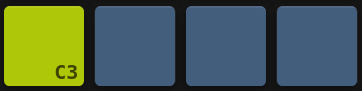
One sustain region, four steps long. The yellow-green pad is the step you pressed first and the slate pads behind it are that same note still sounding.
The sustain region wraps across bar boundaries: if start = 14 and end = 3, steps 14→16 and 1→3 all become SUS_HOLD.
Breaking a sustain: pressing any step inside an existing sustain region with any modifier clears the sustain back to individual steps before applying the new status.
Row mode (column 9 on LHS)
The rightmost button on each row of the LHS LP sets the row play mode for that row. The action depends on the LC modifier held:
| LC modifier | Action |
|---|---|
| (none) | Instant toggle MUTED ↔ UNMUTED |
| SHIFT | Row autodrop: cue an autodrop for this row (row will auto-unmute after the cycle) |
| MUTE | Toggle DRONE: if the row is muted, enter Drone immediately; if in Drone range: → Muted; if unmuted: → Drone |
| SOLO | Toggle LEGATO: same logic as MUTE but targets Legato mode |
| REC ARM | Cued transition at bar 1: cues unmute, or cues the current mode to mute at next 16-bar boundary |
| MUTE + REC ARM | Cued DRONE: cue the row to enter Drone mode at next bar 1 |
| SOLO + REC ARM | Cued LEGATO: cue the row to enter Legato mode at next bar 1 |
Row cues land at bar 1 of the 16-bar cycle only, so one set early in a cycle waits a while. Repeating the gesture that set a cue cancels it and leaves the row playing as it already was, which is the quick way out if you change your mind. Sequencer mutes are the more immediate layer: theirs also get a chance at bar 9 (see Mutes and row states).
Row play modes: column 9 is a round button, so its colours are shown round here to separate them from the square step pads above.
| Row state | Button | Behaviour |
|---|---|---|
| Muted | Unlit | Row is silent; no notes fire |
| Cued to unmute | Slate | Muted, with an unmute waiting for the next boundary |
| Unmuted | Orange | Normal step playback |
| Drone | Teal-green | A single note fires immediately on entering Drone and is held until Drone exits |
| Legato | Blue | Steps play with extended duty: notes connect into each other |
| Unmuted with arp | Magenta | Unmuted, with an arp running on the row |
| Autodropped in | Purple | Brought in by an autodrop for the cycle |
| Autodropped out | Slate | Dropped out by an autodrop, waiting to return |
A row that is changing state flashes between the two colours rather than showing a third one. A row that is muted and cued to Drone flashes slate and teal-green, and a row that is unmuted and cued to mute flashes orange and unlit.
See Mutes and row states for the full cued-state transition table and LED colours on the LP for row mute states.
Note on Sequencer 13 / TR-8, row 1 (the bottom row), column 9 (LHS only): This position is the Boom-TSK toggle. Pressing it drops the whole kit to a fixed kick-and-offbeat-hat pattern, muting every other TR-8 row on both the main and alt views; pressing it again silences it. This special case overrides the normal row-mode logic (see Boom-tsk).
Reset and randomise (SHIFT + MUTE / SHIFT + SOLO)
These global gestures affect the currently pressed row in the trig view:
| Gesture | Effect in trig view |
|---|---|
| SHIFT + MUTE (hold both, then press a step in any column) | Reset the entire trig row to all-OFF. Also clears any Euclidean pattern on that row. |
| SHIFT + SOLO (hold both, then press a step in any column) | Randomise the trig row with a random density pattern. |
These gestures are view-aware: the same gesture produces different effects in other views (step velocity, step duty and so on). Reset and randomise has the full matrix.
Cross-references
- Building a pattern: two worked examples, writing a pattern and what sets note length
- Euclidean trigs: Euclidean overlay density/length controls (LC-based)
- Mutes and row states: Row mute state LED colours and cued-transition behaviour
- Reset and randomise: Full reset/randomise matrix across all views
- Note arp: the note arp view
- LaunchControl modifier buttons: LC modifier button reference