
Octave tree
The octave tree view lets you set the base octave per row of a given sequencer. It also allows the design of per-row octave patterns that evolve in eight 4-step chunks over a 2-bar cycle. So each row on a sequencer can have a base octave different to the other rows and an additional 8-slot octave sequence that shifts the row’s pitch up or down during playback.
Per-row octave setting
An 8×8 grid, one row per sequencer row. Column 4 is the centre marker (a mustard-coloured line down the grid) and represents an unmodified row. Pushing buttons to the right of this will increase the octave, showing green for each additional +ve octave modifier, and the same can be done to push a row to a lower octave by pushing to the left of the centre, showing a red-lit button for each additional -ve octave modifier.
So a row with three green cells sits three octaves up, and a row with two red cells sits two octaves down. It can go up to +4, and down to -3 (three columns to the left of centre, four to the right).
| Cells lit | Meaning | Colour |
|---|---|---|
| Column 4 only | Row plays at its normal octave | Mustard centre marker |
| Columns 5–8 | +1 … +4 octaves | Green |
| Columns 1–3 | −3 … −1 octaves | Red |
Per-row octave sequencing
The octave a row plays at is the sum of the sequencer octave set overall for the sequencer (hold SHIFT and use that sequencer’s two LC buttons, the top one to raise and the bottom one to lower), the base per-row octave you set on the left pad as per the section above, and then the sequenced per-row octave, which is the relevant per-row octave modifier for the given step that a sequencer is playing.
The octave sequence is eight slots long and each slot covers four steps of the bar, so it takes two bars to work through all eight:
| Bar | Steps 1–4 | Steps 5–8 | Steps 9–12 | Steps 13–16 |
|---|---|---|---|---|
| Even | RHS slot 1 | RHS slot 2 | RHS slot 3 | RHS slot 4 |
| Odd | RHS slot 5 | RHS slot 6 | RHS slot 7 | RHS slot 8 |
So the sequence has two halves. Even bars use the first four slots and odd bars the second four, giving an octave pattern that moves within the bar and shifts again on alternating bars.
The per row octave setting is the left hand side, and the octave sequencing is the right hand side of this image.
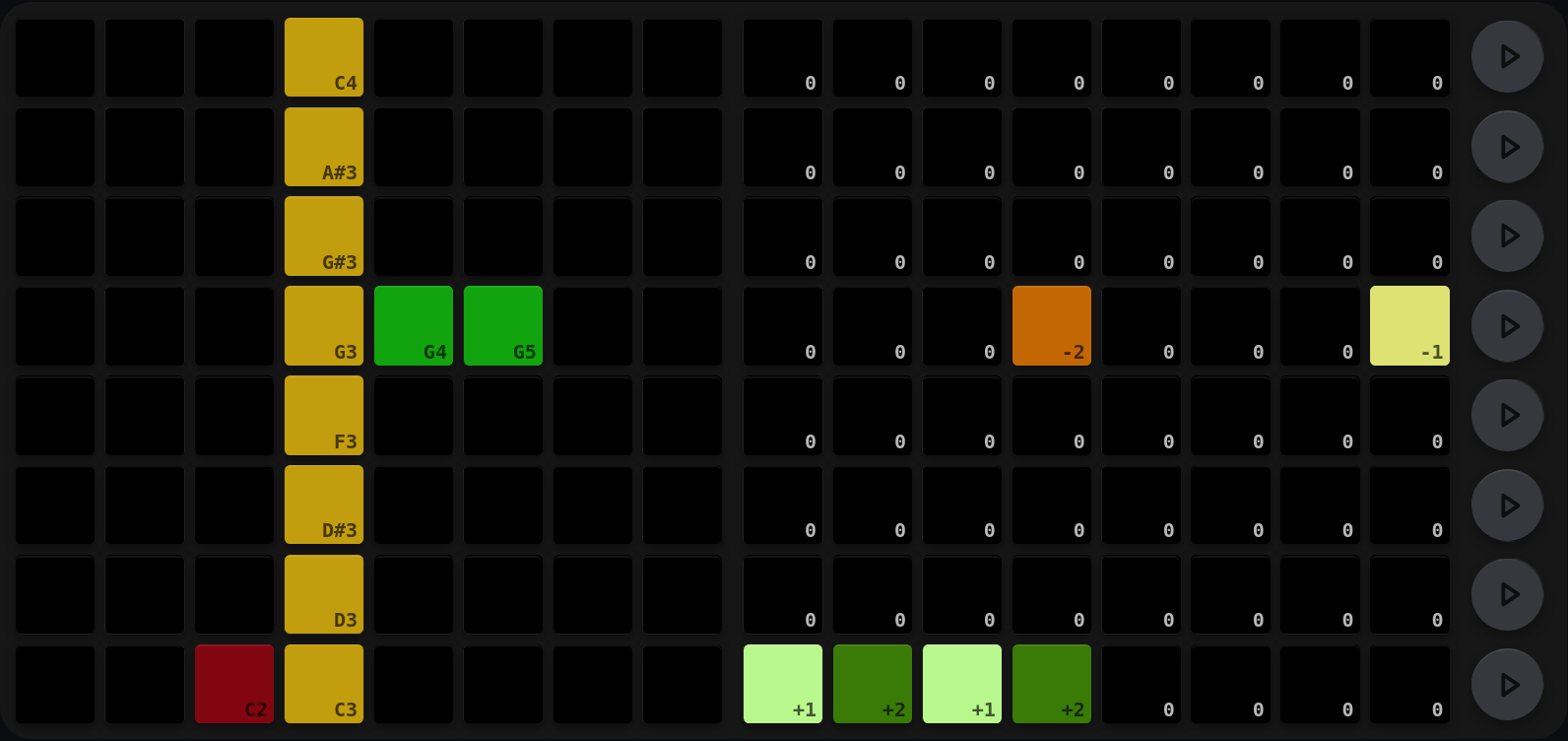
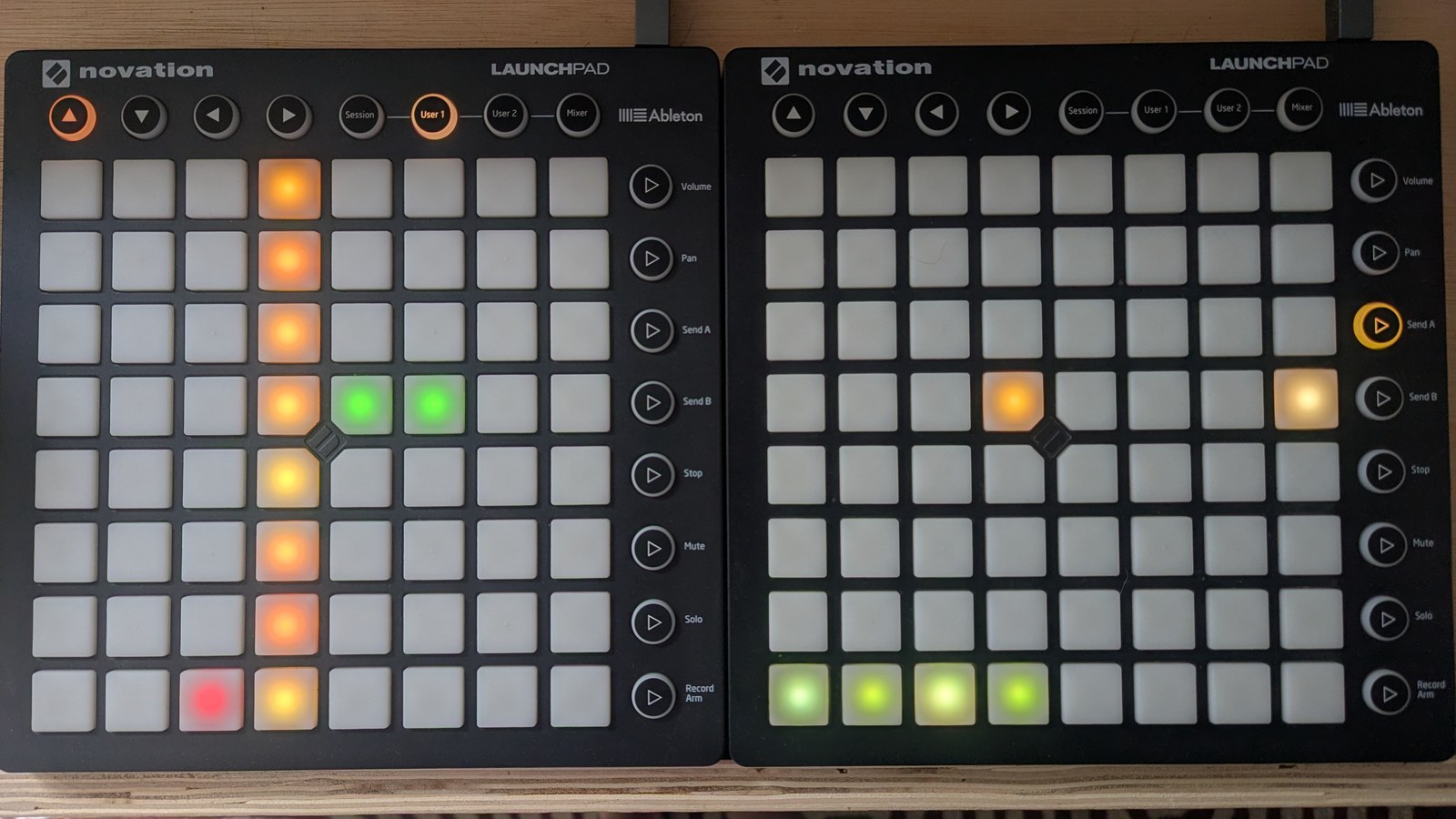
The C minor chord from Trigs pulled apart: the root row dropped an octave to C2, the third stayed where it is, and the fifth lifted two octaves to G5. The fill counts the base-octave shift, and the label on the outermost cell is the note that row will now play. The meta-sequencer on the right adds movement: the root row alternates +1 and +2 through its first four slots, while the G3 row drops by 2 in slot 4 and by 1 in slot 8.
On the right-hand pad each row is one sequencer row, and each of its eight cells is one slot. Press a slot and its value cycles round. The colour tells you where it landed, warm for down and green for up:
| Offset | Colour |
|---|---|
| −4 | Red |
| −3 | Dark red |
| −2 | Burnt orange |
| −1 | Pale yellow |
| 0 | Unlit |
| +1 | Pale green |
| +2 | Olive green |
| +3 | Green |
| +4 | Bright green |
A slot at 0 is unlit, so a row with no movement in it stays dark and anything lit is a shift.
Pressing a slot on its own walks through the whole range, which means passing through values you don’t want on the way. Hold an LC modifier to narrow it:
| LC modifier | Pressing a slot cycles it through |
|---|---|
| (none) | the full range, −4 … +4 |
| SHIFT | up only, 0 … +4 |
| MUTE | down only, −4 … 0 |
| REC ARM | resets that slot to 0 |
So SHIFT + MUTE are how you get to a value without walking past it, and REC ARM is the quickest way to punch a single slot back out of the pattern.
The two pads add up. If the LHS LP puts a row at −3 and the first slot on the RHS LP is +1, that row plays at −3 for most of the bar but lifts to −2 for steps 1–4 of every even bar. Any slot can take any value, so you can be constantly shifting, or shifting in an A/B style pattern over the two bars.
Reset and randomise
| Gesture | Effect |
|---|---|
| SHIFT + MUTE, press row R | Reset row R’s base octave to 0 and all 8 sequence values to 0 (flat, no octave movement) |
| SHIFT + SOLO, press row R | Randomise: base octave → random in [−3, 4]; each sequence slot → random in [−4, 4] |
Cross-references
- Key and following: Chord row-octave sequencing works in parallel with per-row octave trees
- Trigs: trig view, where sequencer-level octave is set via SHIFT + top-row and MUTE + top-row LC buttons
- Reset and randomise: Full reset/randomise matrix across all views