
Euclidean trigs
A Euclidean pattern is an overlay on a row of the trig view. It fills the steps you have left empty and never touches the ones you have written.
Any trig you place on a step wins over the pattern. That makes the trig grid your editor for it. Hold MUTE and press a step to silence one hit with a TRIGMUTE. Add ON, mod or percentage-chance trigs on the steps in between to embellish it.
A Euclidean hit is an ordinary trig. It plays exactly as an ON trig would, with its velocity, duty and note coming from the step values, the velocity and duty arps and the row’s note arp.
How to add a Euclidean trig pattern
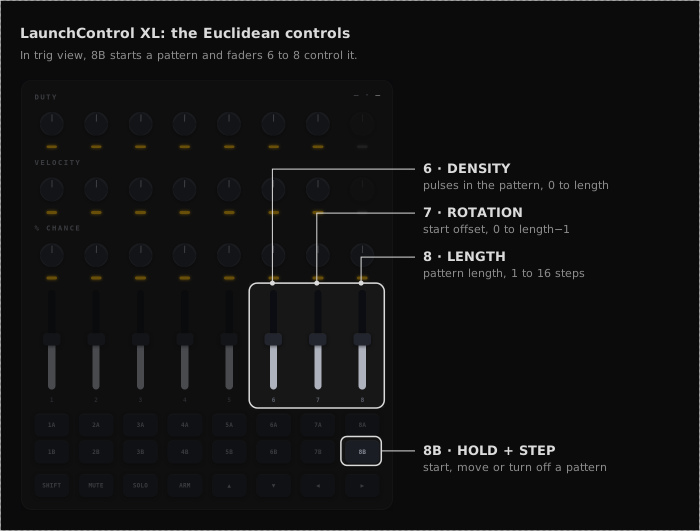
In a trig view, hold 8B on the LaunchControl XL and press a step on the Launchpad grid. That step becomes the start of a Euclidean pattern with a single pulse on it.
Faders 6, 7 and 8 then control the pattern, as the diagram shows.
- Density (fader 6): raise it to add pulses. The MSEQ spreads them as evenly as it can along the row.
- Rotation (fader 7): moves the whole pattern along the row.
- Length (fader 8): sets how many steps the pattern runs before it repeats, from 1 to 16.
The faders edit the selected row, which is the last row you pressed with 8B. Each player has their own selected row on each sequencer. To move a pattern, hold 8B and press a different step on its row. To turn it off, hold 8B and press the step it starts on.
Turning a pattern off keeps its density and length. Hold 8B and press a step on that row again, and the pattern comes back in the same shape, starting on the step you pressed.
Clear behaviour
SHIFT + MUTE row reset in trig view clears both:
- The base trig row (all steps set to OFF)
- The Euclidean overlay for that row (disabled + pattern zeroed)
Density, rotation, and length parameters are not cleared. They are preserved so re-enabling the row with 8B restores the same pattern shape.