
Mutes and row states
MSEQ mutes at two levels, and they work independently of each other.
Sequencer mutes control a whole sequencer. Mute one and every row in it goes silent. Unmute it and every row goes back to playing in whatever state you left it in. You set sequencer mutes from the LaunchControl XL, one button per sequencer.
Row mutes control a single row within one sequencer. A row often carries just one note of the sequence, so a row mute lets you take that note out of the pattern and leave the rest playing. You set row mutes from the column of round buttons down the right-hand edge of your left Launchpad, one button per row.
Row mutes also do more than switch a row on and off. As well as muted and unmuted, a row can drone, holding a single note for as long as it stays in that state, or play legato, stretching each note so that it runs into the next. The four states are described in full under Row mutes.
You can do all of this from the webapp as well. Its LaunchControl panel has the same two rows of sequencer buttons, and the round buttons beside its grid are the row mutes. In the browser the modifiers are toggles: tap ARM once for REC ARM, make your presses, then tap it again to release it.
Cues and autodrops
You can change sequencer mutes and row mutes in two ways that wait for the music: a cue or an autodrop.
Cues
A cue is a mute change you set now that lands later, at the next 8-bar or 16-bar boundary of the cycle. MSEQ runs a 16-bar cycle, counted bar 1 to bar 16, so bar 1 is the top of the cycle and bar 9 is the halfway point. A cue lets you bring a sequencer in, or take it out, exactly where the music turns over rather than wherever your hands happened to be.
- 8-bar cue (a plain press on the LaunchControl’s top row of buttons) lands at bar 9 or bar 1, whichever comes round first. Press in the first half of the cycle and it lands at bar 9. Press in the second half and it waits for bar 1.
- 16-bar cue (the same press with REC ARM held) only ever lands at bar 1.
- Row cues only ever land at bar 1. A row has no 8-bar cue, so a row cued at bar 10 waits seven bars.
A cue is not a next-bar promise. Pressed just after a boundary, it can sit for up to eight bars (or up to sixteen, if it only lands at bar 1) before anything happens.
Autodrops
An autodrop is the performative version: a mute that lands at the next timing point and then takes itself back off. A playing sequencer or row goes silent at the next timing point and comes back at the top of the next cycle, with no second press.
Every autodrop ends at bar 1, but it starts at whichever timing point comes next after your press, so the length of the drop depends on when you press:
| You press during | The drop starts at | It lasts |
|---|---|---|
| Bars 1 to 8 | Bar 9 | 8 bars |
| Bars 9 to 12 | Bar 13 | 4 bars |
| Bars 13 to 15 | Bar 16, step 1 | 1 bar (16 steps) |
| Bar 16, steps 1 to 8 | Bar 16, step 9 | 8 steps |
| Bar 16, steps 9 to 12 | Bar 16, step 13 | 4 steps |
Cue early for a long break, or cue in the last bar for a quick fill. Press the same button later each cycle and the drops get shorter, which pushes the music towards the turnaround without you counting a single bar. Hold REC ARM and the drop waits for bar 1 instead and lasts the full 16 bars.
A muted row works the other way round: it autodrops in, playing for the length of the drop and then going quiet again. The full gestures and every autodrop flavour are in Autodrops.
Sequencer mutes
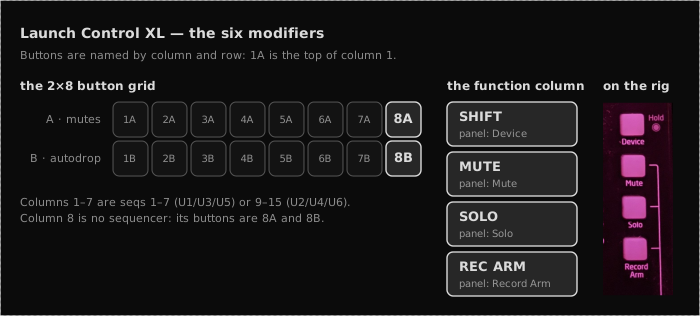
Sequencer mutes live on the two rows of buttons along the bottom of the LaunchControl XL, beneath the faders. Each row has eight buttons. The first seven belong to one sequencer each, column by column, so the third button in either row is sequencer 3. The top row mutes and unmutes. The bottom row cues autodrops.
Which sequencers the seven columns stand for depends on the active LC user
template: U1, U3 and U5 show sequencers 1–7, U2, U4 and U6 show
sequencers 9–15. (Column 8 of both rows is not a sequencer. Those two buttons
are the 8A / 8B modifiers, see LaunchControl modifier buttons.) Any modifier
not listed in the two sections below does nothing on these rows, so a stray hold
costs you nothing.
Top row of buttons: mute and unmute
Press a sequencer’s button in the LC’s top row of buttons (1A to 7A) to cue it to mute or unmute at the next 8-bar boundary. Press it again before the cue lands and the cue is cancelled. What a press does depends on what the sequencer is doing:
| Sequencer is | Pressing its top-row button |
|---|---|
| Playing | Cues a mute at the next 8-bar boundary |
| Cued to mute | Cancels the cue: the sequencer keeps playing |
| Muted, or silenced by an autodrop | Cues an unmute at the next 8-bar boundary |
| Cued to unmute | Cancels the cue: the sequencer stays muted |
| Cued to autodrop | Cancels the autodrop: the sequencer keeps playing |
Hold REC ARM and the same presses cue to the 16-bar boundary instead, so the change waits for bar 1.
Under two other modifiers the top row changes octaves instead:
- SHIFT + press raises the sequencer octave by one, up to +4.
- MUTE + press raises the jam keyboard octave by one, up to +8.
Bottom row of buttons: autodrop
Press a sequencer’s button in the LC’s bottom row of buttons (1B to 7B) to cue an autodrop. The sequencer goes silent at the next timing point and comes back on its own at bar 1 (the timing is under Autodrops above). Hold REC ARM to cue a 16-bar autodrop instead, which waits for bar 1 and lasts the whole cycle.
| Sequencer is | Bottom-row press | REC ARM + bottom-row press |
|---|---|---|
| Playing, or cued to mute | Cues an autodrop | Cues a 16-bar autodrop |
| Cued to a 16-bar autodrop | Cancels it: the sequencer keeps playing | Cancels it: the sequencer keeps playing |
| Cued to any other autodrop | Makes it a plain autodrop (no change if it already is one) | Switches it to a 16-bar autodrop |
| Muted, or silenced by an autodrop | Nothing | Nothing |
A bottom-row press never cancels a plain autodrop cue. To take one back, press the sequencer’s top-row button.
Under other modifiers the bottom row does something else:
- SHIFT + press lowers the sequencer octave by one, down to −4.
- MUTE + press lowers the jam keyboard octave by one, down to 0.
- SHIFT + SOLO + press cues a CC autodrop (see Autodrops).
Autodrop types
There are four autodrop modes, selected by which LC modifier is active when the autodrop fires:
| Mode | Description |
|---|---|
| Mute drop | Sequencer output is silenced for the duration |
| 16-bar mute drop | The same, but fired at 16-bar boundaries and held for the whole cycle |
| CC drop | Intended: CC keeps moving, notes suppressed |
| Note drop | Intended: notes keep playing, CC suppressed |
The two mute modes work. The CC and note drops cue, time and light correctly but do not yet suppress anything on a synth sequencer: the engine treats both as unmuted, so the sequencer plays on. See the “Limitations” section of Autodrops for why.
LED colours
Both rows of LC buttons light to show each sequencer’s mute state. A flashing button is drawn as both of the colours it alternates between.
| State | Top row LED | Bottom row LED |
|---|---|---|
| Unmuted | Green | Off |
| Cued to mute | Flashing off/green | Off |
| Muted | Red | Off |
| Cued to unmute | Yellow | Off |
| Cued to mute on the 16 | Flashing off/green | Flashing off/green |
| Cued to unmute on the 16 | Yellow | Yellow |
| Cued to mute-drop | Flashing green/off | Flashing off/red |
| Mute-drop running | Yellow | Red |
| Cued to CC drop | Green | Flashing off/yellow |
| CC drop running | Green | Yellow |
| Cued to note drop | Green | Flashing off/orange |
| Note drop running | Green | Orange |
Row mutes
You set row mutes from the column of round buttons down the right-hand edge of your left Launchpad, one button per row of the selected sequencer. Rows are numbered 1 at the bottom of the Launchpad up to 8 at the top (see the “What You See” section of Trigs).
A plain press mutes or unmutes the row straight away. Hold MUTE and the press makes the row drone. Hold SOLO and it plays legato. Hold REC ARM and the change is cued rather than applied, and REC ARM combines with MUTE or SOLO to cue drone or legato. So you can switch a row the moment you want to, or set the change up now and let it land on the boundary. The full gesture table is in the “Row Mode” section of Trigs.
Each row can be in one of four play modes:
| Mode | Behaviour |
|---|---|
| Unmuted | Normal step playback |
| Legato | Steps play with extended duty: notes connect into each other |
| Drone | A single note fires immediately on entering this mode and is held continuously until the row leaves Drone mode |
| Muted | Row is silent; no notes fire |
Cued transitions
A row cue lands at bar 1 only (see Cues above). You can cue a row from any of the four states to any other.
Pressing the same cue gesture again cancels it and leaves the row in the mode it is already playing, so a cue you change your mind about costs you one press rather than a wait.
Hold SHIFT and press a row’s button to cue a row autodrop from whichever state the row is in. A playing row drops out and a muted row drops in, and the row goes back to its state at bar 1 (see Autodrops above).
Row LED colours
The row buttons show the current state directly. Cued states blink between the current colour and the colour it is heading for, so you can always see both where a row is and where it is going.
| State | Colour |
|---|---|
| Muted | Off |
| Muted, cued unmuted | Slate grey |
| Muted, cued drone | Slate grey / teal-green |
| Muted, cued legato | Slate grey / blue |
| Drone | Teal-green |
| Drone, cued muted | Teal-green / off |
| Drone, cued unmuted | Teal-green / orange |
| Drone, cued legato | Teal-green / blue |
| Legato | Blue |
| Legato, cued muted | Blue / off |
| Legato, cued unmuted | Blue / orange |
| Legato, cued drone | Blue / teal-green |
| Unmuted | Orange |
| Unmuted, cued muted | Orange / off |
| Unmuted, cued drone | Orange / teal-green |
| Unmuted, cued legato | Orange / blue |
| Muted, cued autodrop in | Slate grey / purple |
| Drone, cued autodrop in | Teal-green / purple |
| Legato, cued autodrop in | Blue / purple |
| Unmuted, cued autodrop in | Orange / purple |
| Drone, autodropped out | Slate grey / teal-green |
| Legato, autodropped out | Slate grey / blue |
| Unmuted, autodropped out | Slate grey |
| Autodropped in | Purple |
A row whose note arp is running shows magenta in place of orange for the unmuted states, so you can see at a glance which rows are moving. On the TR-8 the unmuted colour is replaced by the per-voice drum colour instead: red for kick and hand claps, green for snare and hats, blue for toms and rimshot.
Drone behaviour
When a row enters Drone mode, MSEQ fires the note that row would play at that moment (its current note-arp position, under the current scale, chord and octave settings) and holds it as a sustained MIDI note-on. When the row leaves Drone mode, MSEQ sends a note-off for that held note. The drone keeps the note it started with: change the chord or scale later and the held note does not follow. If the row has an octave sequence, the drone takes the octave set for steps 1 to 4, whichever step the playhead is on when you press.
A drone sounds only while its sequencer is unmuted. Mute the sequencer, or let a mute autodrop take it out, and MSEQ stops the drone along with every other row. Unmute it and the drone starts again on the note the row would play now, so it picks up any chord change made in the meantime. Stopping the DAW silences every drone too, and pressing Start brings each one back the same way. Loading a session, a sequencer or a chord progression, or undoing a load, does the same: every drone that is still meant to sound restarts on the next step.