
Modifier buttons
MSEQ uses 6 LaunchControl XL buttons as modifiers. These can be held alone or in pairs, and the combination decides what a pad press does in the current view.
Physical layout
The 6 are in two different places on the unit. Buttons 1–4 are the function column down the right-hand edge, labelled Device / Mute / Solo / Record Arm on the panel. Button 1 is called SHIFT throughout these pages, because that is what it does here. Buttons 5 and 6 are the two buttons in column 8 of the 2×8 button grid, one above the other: the column that would otherwise be sequencer 8’s mute and autodrop.
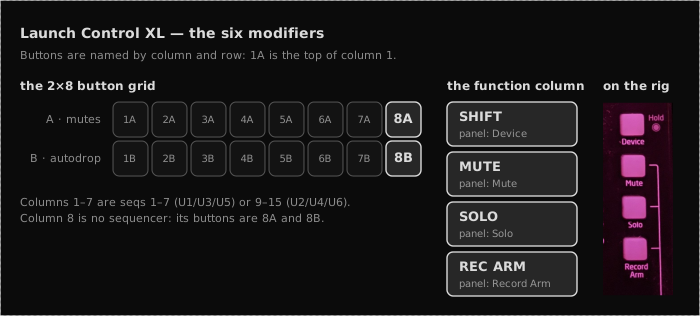
The photograph on the right is that column as it is actually labelled. SHIFT is the button the panel calls Device: worth knowing before you go looking for a shift key that is not there. The Hold indicator beside it and the bracket down the side are Novation’s factory-mode markings and do nothing under the MSEQ templates.
The buttons only speak to MSEQ once a user template is loaded onto the unit: see LaunchControl knobs and faders for the templates and what each one addresses.
What each modifier does
Buttons can be held in pairs as well as alone. Not every pair does something different: an unlisted pair behaves as though only the first button were held. 8A and 8B pair only with each other.
| Button held | trig view behaviour |
|---|---|
| (none) | Toggle step ON/OFF |
| SHIFT | Toggle step to percentage chance |
| MUTE | Toggle step to trig mute |
| SOLO | Set sustain start/end points |
| REC ARM | Mod-chance increment: OFF → MOD1 → MOD2 → MOD4 → MOD8 → MOD16 → OFF; an INVMOD step converts back to its matching MOD |
| 8A | Inverse mod chance, and INVMOD back to the matching MOD |
| 8B | Euclidean trig overlay: pressed step sets rotation |
| SHIFT + MUTE | Reset row (clear trigs + Euclidean overlay) |
| SHIFT + SOLO | Randomise row (random-density trig fill) |
| SHIFT + REC ARM | (reserved) |
| MUTE + SOLO | (reserved) |
| SOLO + REC ARM | (reserved) |
| 8A + 8B | Full mod → inv-mod increment cycle (MOD1 … MOD16 → INVMOD4 … INVMOD16 → OFF) |