
Velocity and duty arps
Velocity and duty arps store a pattern of up to eight values per sequencer row. Every time a row’s trigger fires, the row takes the next value in its pattern, then wraps back to the start when it reaches the end of the pattern’s length. A velocity arp moves on past its own rests. A duty arp moves on only when a note actually plays, so a rest never uses up a duty value.
There are three of them:
- Velocity arp. Each value picks a point on the sequencer’s velocity curve, and that multiplier scales the velocity from the step velocity view and the velocity knob. A value whose point is ×0 silences the hit.
- TR-8 velocity arp. One pattern per drum voice, with separate patterns for the main and alt kits. Each value picks a point on the TR-8’s velocity curve, and the accent knob blends it with the accent on that step. A value whose point is ×0 silences the hit.
- Duty arp. A modifier on top of the note length you already set in the step duty view. Values above 5 make each note longer, values below 5 make it shorter, and 5 leaves it as it is.
By default each row’s pattern is one value long and that value is neutral, so the arps change nothing until you edit them.
The pattern advances on triggers, not on the clock, so its length does not have to match the row’s trigs. A four-value pattern on a row with three trigs moves its accents, ghost notes and rests onto a different hit every bar, and takes four bars to come back round.
What a value means
Every arp value is a number from 1, on the bottom row, to 8, on the top row. What it does depends on the arp.
Velocity arp
A velocity arp value picks a point on the sequencer’s velocity curve, and the hit’s velocity is multiplied by that point. On the default curve a 6 leaves the hit as it is, and a 1 is a rest: the trig stays, but that pass of the pattern plays nothing.
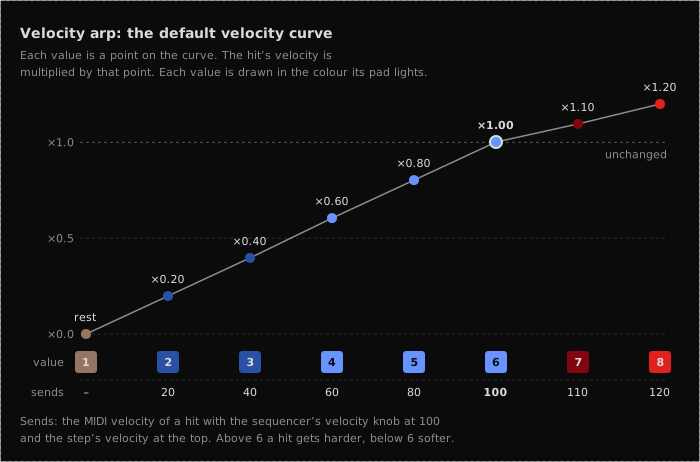
The arp is the last of three things that set a hit’s velocity: the step velocity view and the sequencer’s velocity knob (the middle knob row on the LaunchControl) come first, and all three multiply together. The figure’s bottom row shows what that sends with the knob at 100 and the step at the top. The MSEQ never sends more than 127, or less than 10 for a hit that plays.
The curve is per sequencer, and you can reshape it in the webapp: see Arp curves.
TR-8 velocity arp
The TR-8 velocity arp reads the TR-8’s own velocity curve in the same way, with one pattern per drum voice. The TR-8 has no step velocity. Instead the accent sequencer holds one value per step, shared by the whole kit, and the accent knob (the top knob in column 5) sets the balance between the two. Turned fully down, only the velocity arp counts; turned fully up, only the accent counts; at its default, halfway, each counts for half. The drum velocity knobs then set the overall level (see Drum views). A rest is still a rest wherever the accent knob sits.
While boom-tsk is playing, its row ignores its velocity arp.
Duty arp
A duty arp value does not set a note length. It lengthens or shortens the length the step duty view already gives that step, one note length at a time, through the sixteen note lengths the MSEQ plays. A 5 leaves the note as it is, each value above 5 makes it one length longer, and each value below 5 one length shorter.
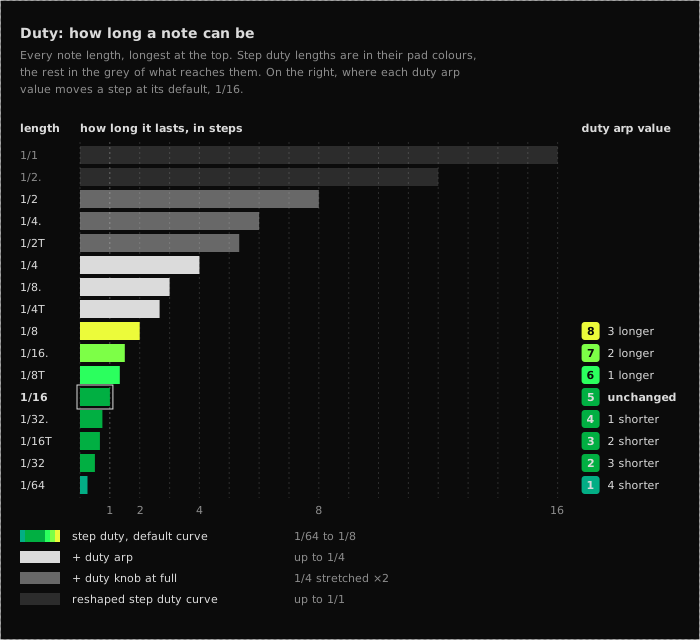
The duty arp uses no curve, so it does the same thing on every sequencer. The sequencer’s duty knob (the top knob row on the LaunchControl) then stretches or shrinks the result. At its centre detent it changes nothing, and turned fully up it doubles the length, which is the grey band in the figure. You can switch that off for a sequencer in Arp curves to get the exact lengths.
Two kinds of note take their length from the trig pattern instead, and ignore the duty arp’s value: a note on a legato row holds until the next trig, and a sustained trig holds across its sustained steps.
What you see
If you have read the Note arps page, this will be familiar: the left hand Launchpad sets the pattern’s length and the right hand Launchpad picks its values. Both Launchpads show values through colour, and the right hand Launchpad shows them by colour and position.
Left hand Launchpad
The pattern overview. Each row shows the length of that row’s pattern, one lit pad per step, coloured by its value: blue up to red on a velocity arp, green up to yellow on a duty arp. On a pattern longer than one value, the step that plays next is bright white.
Right hand Launchpad
The value editor for the row you have selected (the last row you pressed on the left). Each column is one step of the pattern, and each step lights a single pad at the height of its value, from 1 on the bottom row to 8 on the top. It is not a bar filled from the bottom. Steps beyond the pattern’s length still show their stored value, but in slate grey, so you can see where the pattern stops without counting.
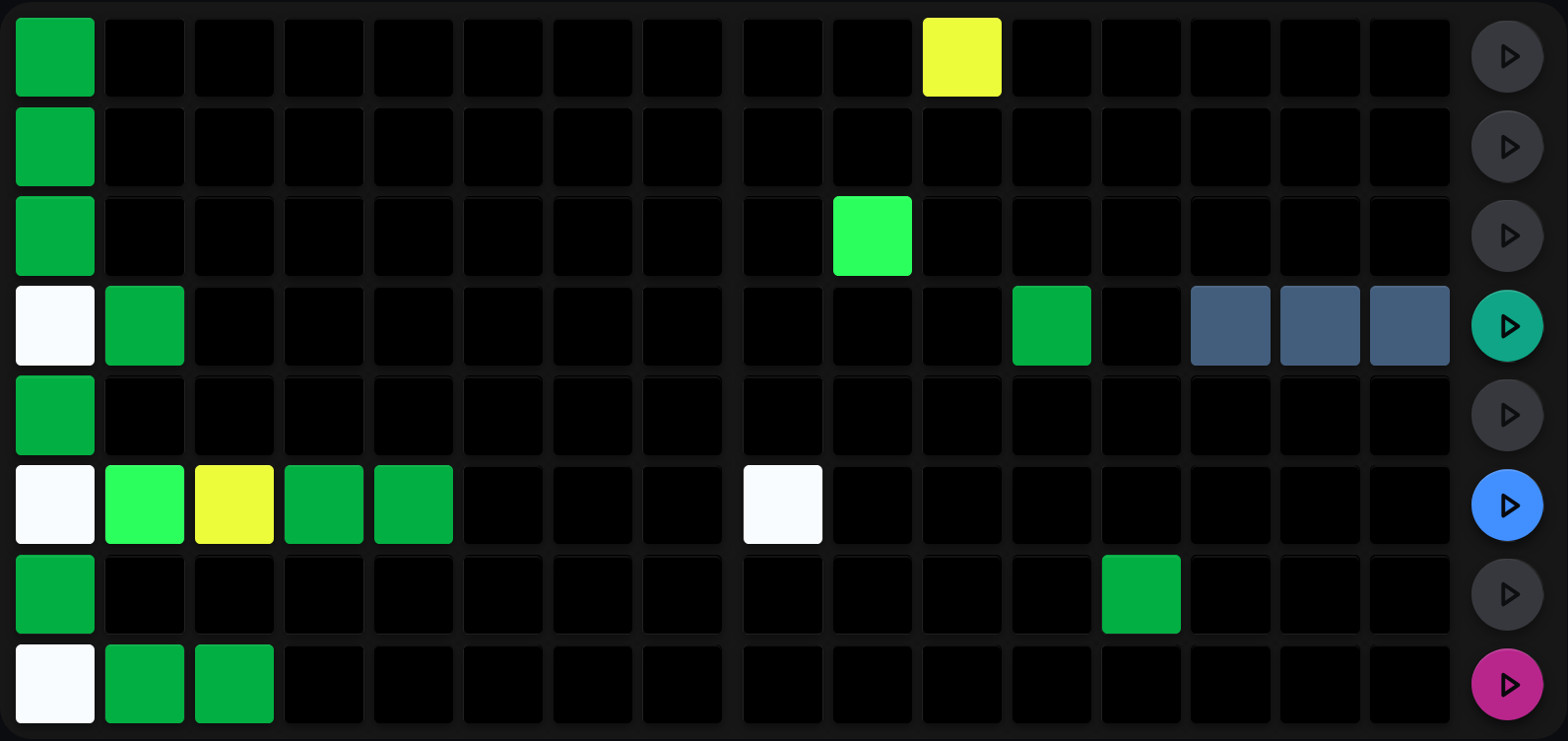
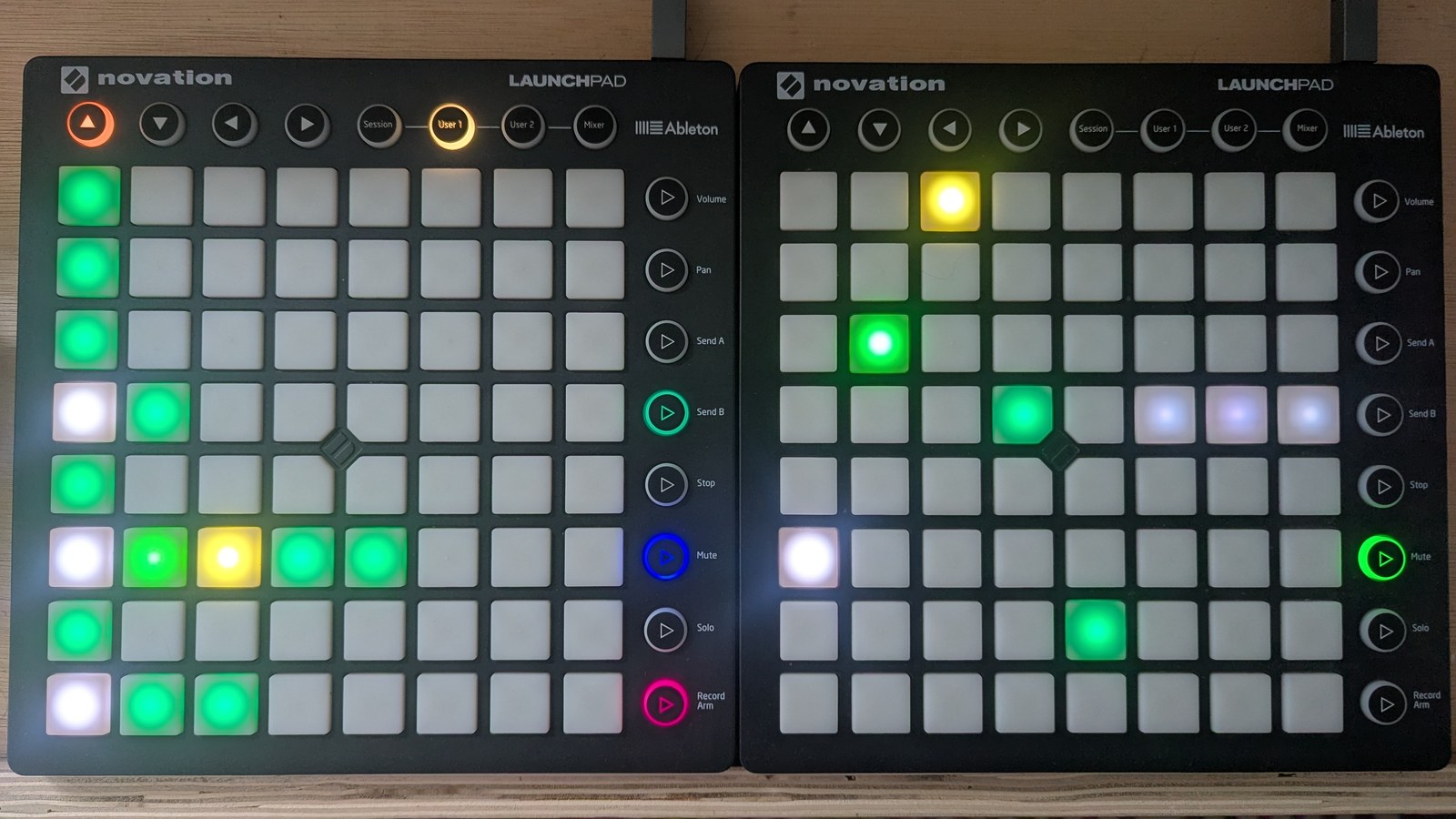
The duty arp. Same three rows as the note arp, same lengths: the LHS LP counts them, the RHS LP edits the selected row’s five values, and bright white marks the step that plays next.
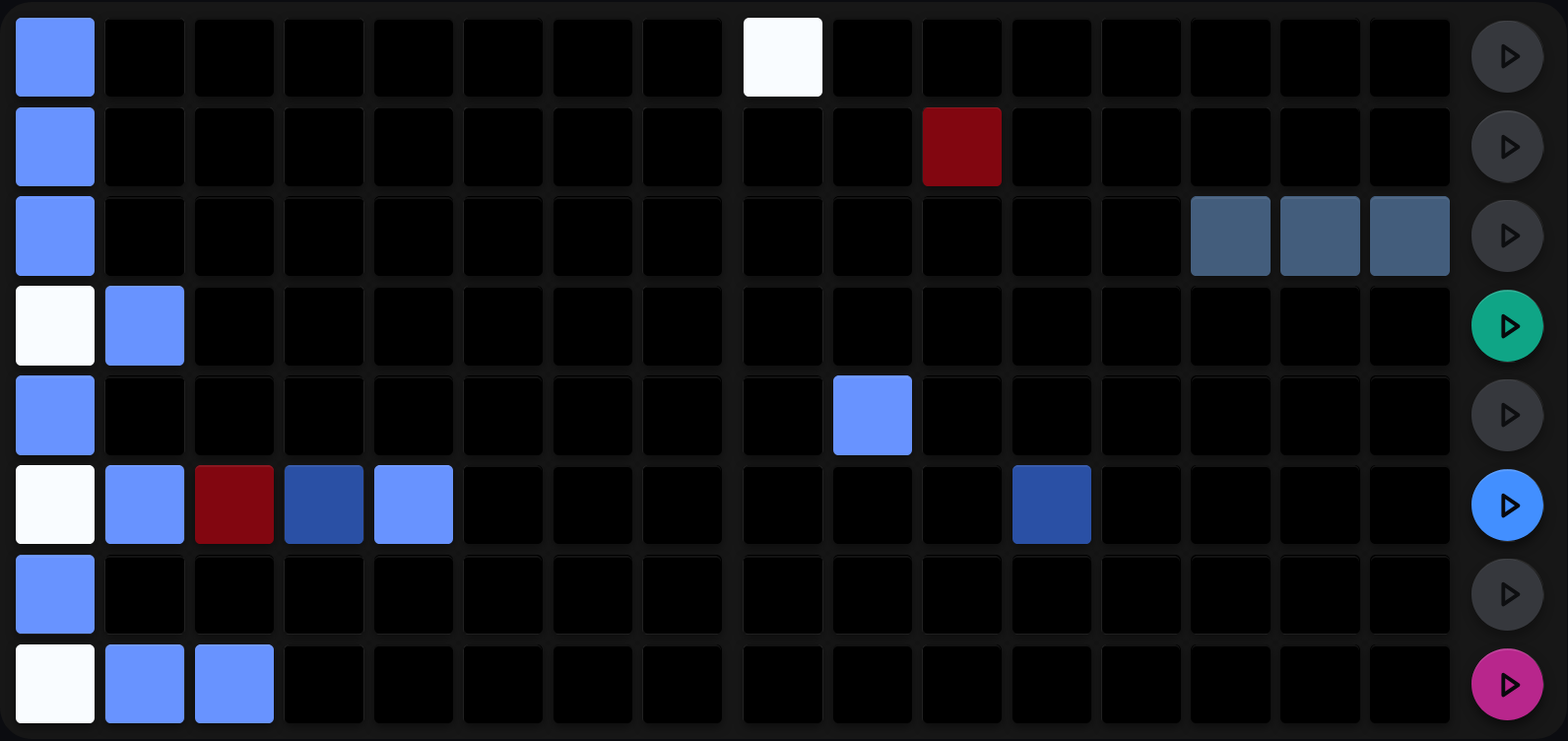
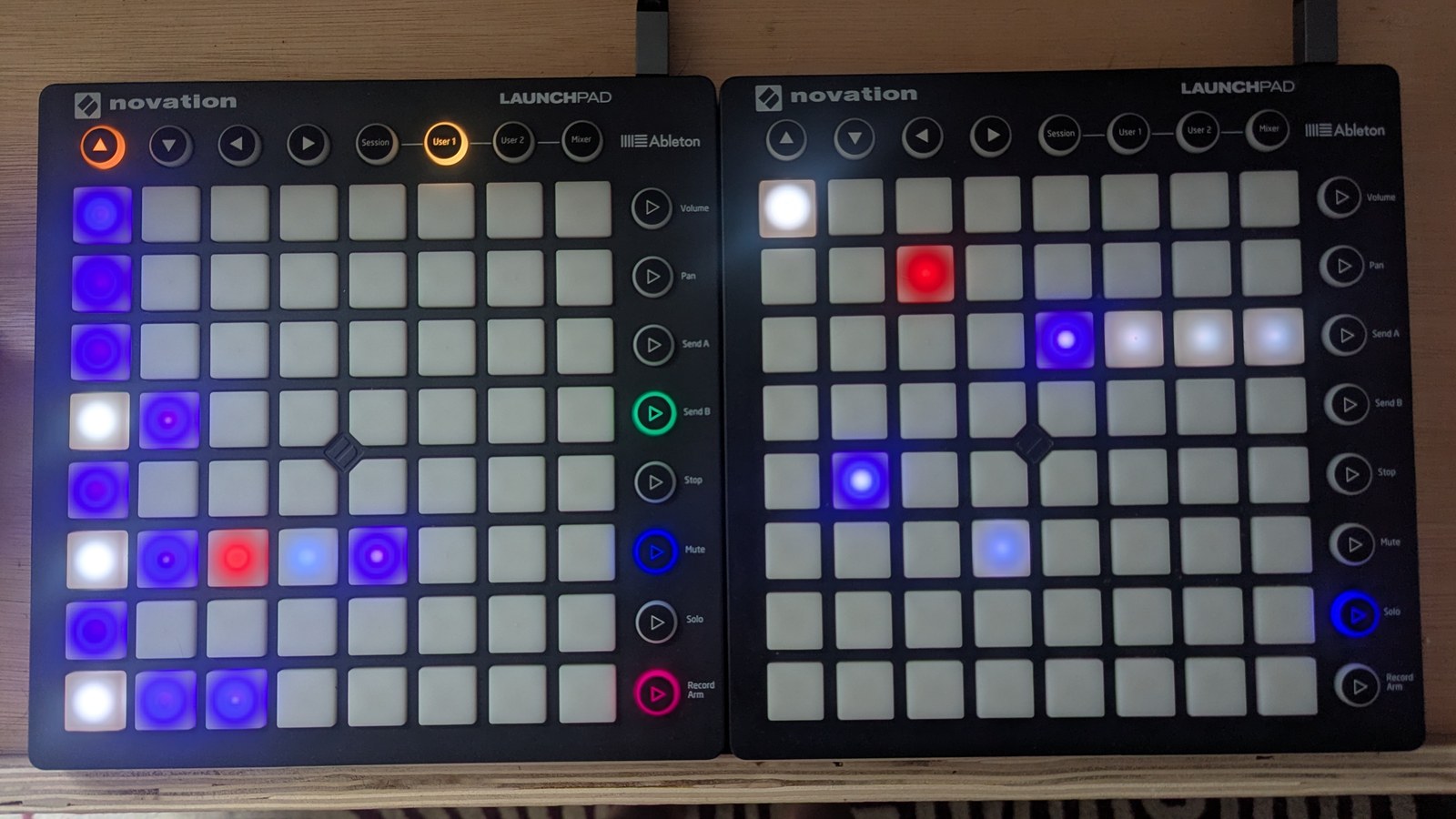
The velocity arp is the same view pointed at velocity. Only the colours change.
Set a pattern’s length
On the left hand Launchpad, hold SHIFT and press a pad, or simply double-tap a pad, to set the pattern’s length. That row’s length becomes the column you pressed: column 1 for a single value, column 8 for all eight.
Steps beyond the new length go dark straight away on the LHS LP, and turn slate on the RHS LP.
Holding SHIFT on the right hand Launchpad sets the length too: the press writes the value and makes the column you pressed the last step. It is the quickest way to draw a short pattern, and easy to do by accident.
A duty arp one value long moves every note on the row by the same amount, so with a 5 the row plays the lengths you drew in step duty.
Edit the pattern
Editing takes two presses, one on each Launchpad:
- Press a pad on the LHS LP to select that row, or press its row mute button, the round button at the right-hand end of the row.
- Press a pad on the RHS LP to write a value. The column picks the step of the pattern, and the row picks the value: the bottom row is 1, the top row is 8.
On the TR-8, the view edits whichever kit the TR-8 is showing: switch to the alt kit (see Drum views) to edit the alt voices’ patterns.
Reset and randomise
Hold SHIFT + MUTE to reset, or SHIFT + SOLO to randomise, then press a row mute button on the LHS LP or a pad on the RHS LP. Neither changes the pattern’s length.
| Gesture | Effect |
|---|---|
| SHIFT + MUTE + row mute button | Reset that row to its neutral value: 6 on a velocity arp, 5 on a duty arp |
| SHIFT + MUTE + RHS row R | Set every step of the selected row to row R’s value |
| SHIFT + SOLO + row mute button | Randomise the selected row across 1 to 8 |
| SHIFT + SOLO + RHS row R | Randomise the selected row around row R’s value |
On the TR-8, reset gives each voice its own resting velocity: 3 on the second rows of a paired voice (BD2 and SD2 on the main kit, RS2 and CP2 on the alt), 8 on the boom-tsk row, and 6 on every other row.
Reset and randomise has the full matrix across every view.
Cross-references
- Note arp: the same pattern model for pitch
- Step values: step velocity, step duty and the TR-8 accent
- Arp curves: what a velocity arp’s values mean, and how to change that per sequencer
- CC arps: the same length model for CC values
- Drum views: which voice sits on which TR-8 row, and where its velocity knobs are
- Reset and randomise: the full reset and randomise matrix across all views