
CC arps
CC arps store a pattern of up to eight values for each of a sequencer’s CC rows. Each row sends one CC to a synth (see CC assignments). Every time the sequencer plays a note, every CC row takes the next value in its pattern and sends it, then wraps back to the start when it reaches the end of the pattern’s length. Rests don’t count. On the TR-8, rows move together in trig groups instead, so a kick parameter moves with the kick.
- Move a parameter in time with the music. A filter that opens across a phrase, or a decay that alternates long and short.
- Toggle CC arp control. Setting the row to have length 0 means no CC data is sent, so that you can toggle between controlling it via the MSEQ and on the synth.
A pattern whose length doesn’t match the notes lands on a different note each bar.
By default every row has a length of 0, so the CC arps send nothing until you give a row a pattern.
What a value means
Every CC arp value is a number from 1, on the bottom row, to 8, on the top row. A row doesn’t send that number: the value picks one of eight points on the row’s CC curve, and the row sends the CC value at that point. The curve is part of the CC assignment, and the curves are deliberately uneven, so the same height sends a different value on a filter row than on a decay row.
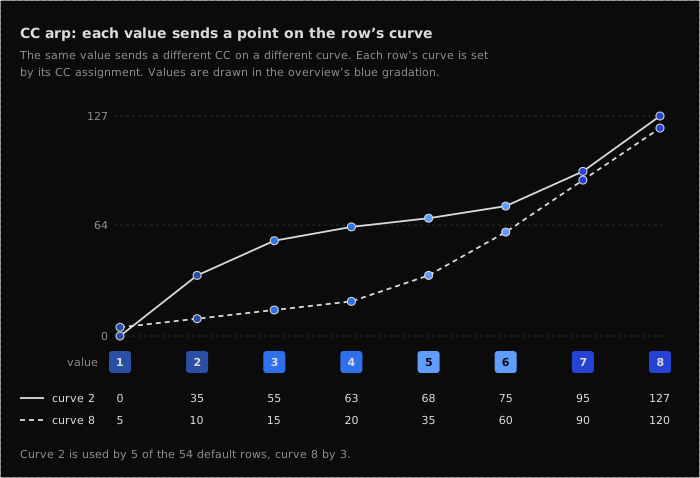
What you see
If you have read the Note arps page, this will be familiar: the left hand Launchpad sets each row’s length and the right hand Launchpad picks its values.
Left hand Launchpad
The pattern overview. Each row shows the length of that row’s pattern, one lit pad per step. The step that plays next is drawn in the row’s own colour (see below), and the other steps show their value in blue, from deep navy for 1 and 2 up to vivid blue for 7 and 8. A pattern one value long is always drawn in the row’s colour.
A row with a length of 0 blinks its first pad, so you can see which parameters are back under the synth’s control. Rows without a CC assignment stay dark: on the NTS-1, for instance, rows 8, 7, 2 and 1.
Right hand Launchpad
The value editor for the row you have selected (the last row you pressed on the left). Each column is one step of the pattern, and each step lights a single pad at the height of its value, from 1 on the bottom row to 8 on the top. It is not a bar filled from the bottom. The colours match the overview, and steps beyond the pattern’s length still show their stored value, but in slate grey, so you can see where the pattern stops without counting.
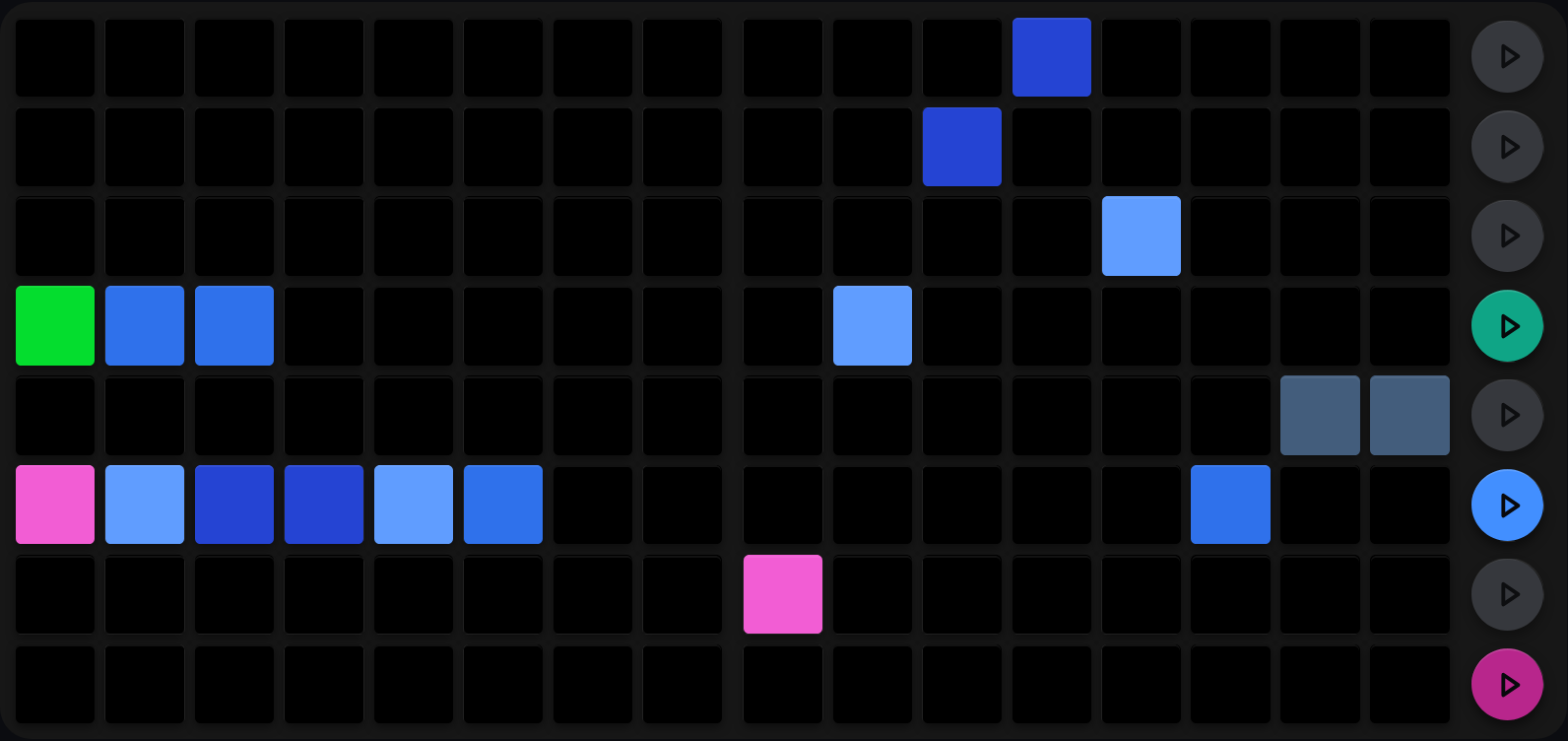
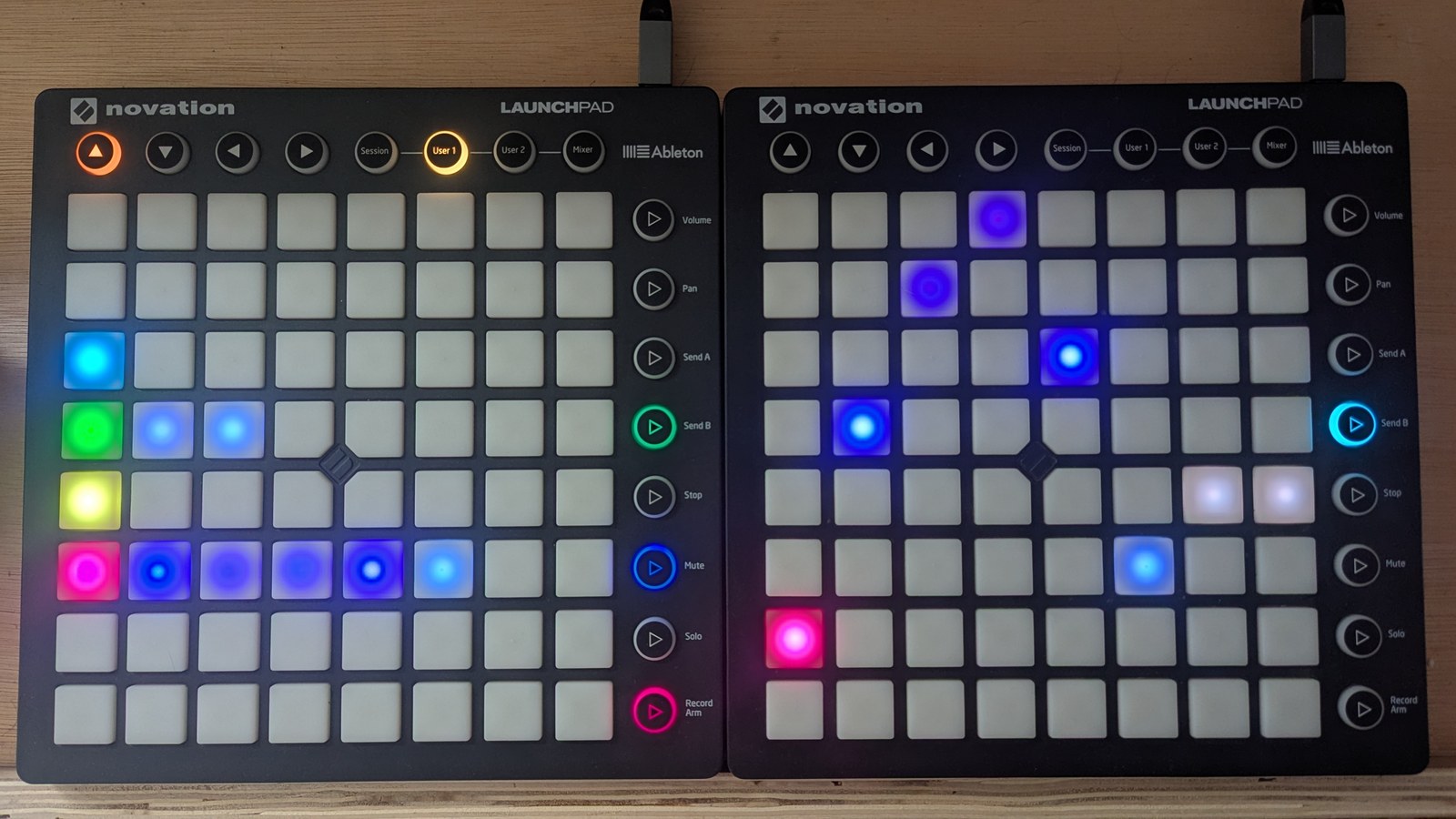
The NTS-1, with four of its eight rows assigned. The green row (filter cutoff) plays three values and the magenta row (modulation effect depth) six, which the right hand Launchpad draws as a contour rising to the top and falling again. The other two assigned rows have a length of 0 and blink their first pad.
Colour tells you what kind of parameter you are moving
Each row is drawn in its CC’s colour, so you can read a CC arp view at a glance without having to remember the assignments. The colour is part of the CC assignment, so it can be changed per synth. These are the colours the default assignments use; CC assignments shows the colour of every row.
On the TR-8 the colours follow the drum parameter instead.
| Colour | Used for |
|---|---|
| Synth sequencers | |
| Bright green | Filter cutoff related CCs, including filter envelope amount |
| Pale lime | Filter resonance related CCs |
| Bright magenta, dim magenta | FX related CCs, such as delay |
| Sky blue, light blue, powder blue | Waveshaping related CCs, including mixing noise into the oscillator |
| Dark gold, vivid orange | Oscillator detune related CCs |
| Khaki | Glide and LFO rate |
| Stone | Decay |
| Ice white | Velocity depth |
| Rust | Transpose |
| TR-8 | |
| Vivid orange | Tuning |
| Stone | Decay |
| Khaki | Tone and snappy |
When you assign a parameter yourself from the webapp, it starts on a colour picked from its kind of parameter, and you can change it there.
Set a pattern’s length
On the left hand Launchpad, hold SHIFT and press a pad, or simply double-tap a pad, to set the pattern’s length. That row’s length becomes the column you pressed: column 2 for two values, column 8 for all eight.
Steps beyond the new length go dark straight away on the LHS LP, and turn slate on the RHS LP.
Column 1 toggles the row between a length of 1 and a length of 0. At 0 the row sends nothing, so the knob on the synth is yours again.
Holding SHIFT on the right hand Launchpad sets the length too: the press writes the value and makes the column you pressed the last step. It is the quickest way to draw a short pattern, and easy to do by accident.
On the TR-8, rows that control the same drum sound share one length: setting the length of one BD row sets all three.
Edit the pattern
Editing takes two presses, one on each Launchpad:
- Press a pad on the LHS LP to select that row. A single press never changes the row’s length.
- Press a pad on the RHS LP to write a value. The column picks the step of the pattern, and the row picks the value: the bottom row is 1, the top row is 8.
Pressing a row without a CC assignment selects it but changes nothing. Each player has their own selected row, so two players can edit different rows of the same view at once. On the TR-8, the main and alt kits have a CC arp view each.
Reset and randomise
Hold SHIFT + MUTE to reset, or SHIFT + SOLO to randomise, then press a row mute button on the LHS LP or a pad on the RHS LP.
| Gesture | Effect |
|---|---|
| SHIFT + row mute button | Switch that row off: length 0 |
| SHIFT + MUTE + row mute button | Reset that row: length 0, every value 4 |
| SHIFT + MUTE + RHS row R | Set every step of the selected row to row R’s value |
| SHIFT + SOLO + row mute button | Randomise that row across 1 to 8, length unchanged |
| SHIFT + SOLO + RHS row R | Randomise the selected row around row R’s value |
Reset and randomise has the full matrix across every view.
Cross-references
- CC assignments: which CC every row of every sequencer sends
- Slew and CC smoothing: smoothing the values these arps send
- Note arp: the same pattern model for pitch
- Velocity and duty arps: the velocity and duty arps these work alongside