
Arp curves
Each sequencer has two curves, a velocity curve and a note-length curve. Each has eight points, one for each value from 1, on the bottom row, to 8, on the top row. The value you draw is not a velocity or a note length: the curve decides what it does on that sequencer, and you can edit both curves.
| Value | Curve it uses |
|---|---|
| Velocity arp, TR-8 velocity arp | the velocity curve |
| Step duty | the note-length curve |
Other values don’t use these curves. Step velocity is a fixed share of the velocity knob, the duty arp moves a step’s length up or down the list of note lengths, and CC arps have their own CC curves, set on CC assignments.
Curves are stored on the Pi, not in sessions or in a sequencer saved on its own, so loading a session or a sequencer never changes them.
Edit a curve
- Open Settings in the webapp and tap Arp curves.
- Choose Velocity or Duty at the top.
- Pick a sequencer from the strip below it.
- Drag a point’s fader, or type in the box under it.
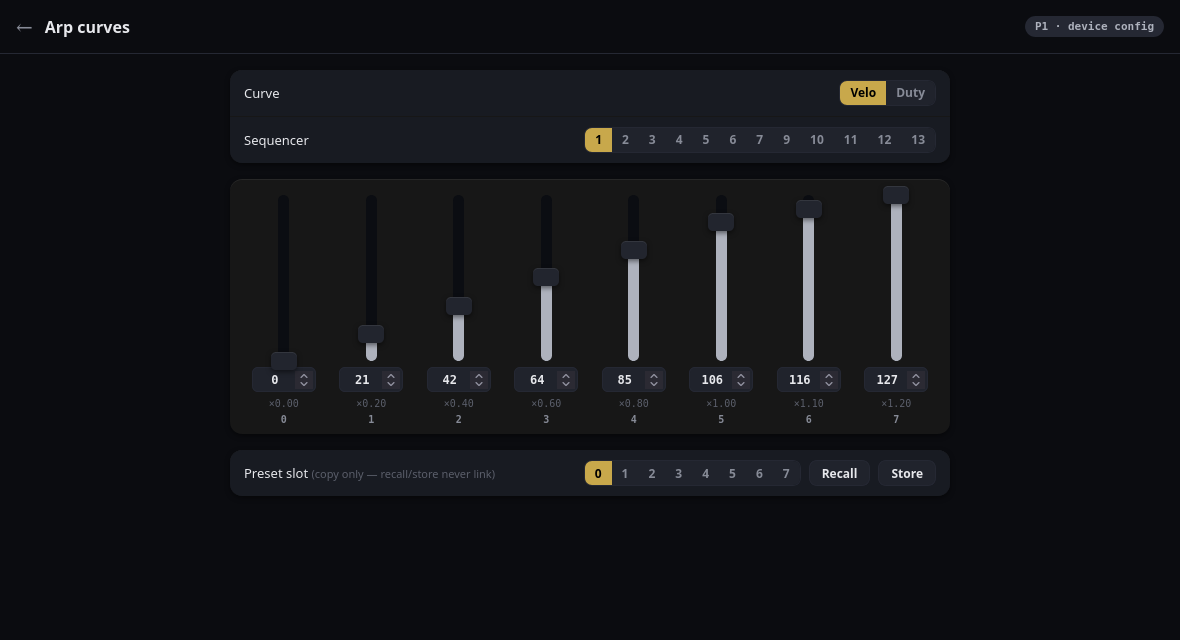
You hear the change as you drag, and it is kept when you let go.
The velocity curve
Each point on the velocity curve is a multiplier from ×0 up to ×1.2. In the editor you set it as a number from 0 to 127, with the multiplier shown underneath. The default curve:
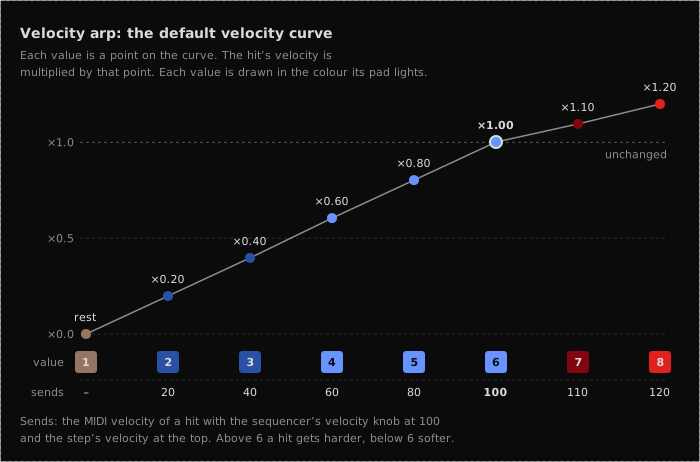
Point 6 is the identity. It is what a freshly seeded pattern holds, so a velocity arp on a new session sounds exactly as though it were switched off until you move something. Above it there is deliberately not much room: two points of lift, because the multiplier is capped and a velocity is capped at 127 anyway.
Twelve sequencers have a velocity curve: 1–7 and 9–13. Sequencer 13 is included because the TR-8 reads the velocity curve too: drums get the same per-row scaling as everything else.
The note-length curve
Each point on the note-length curve is a note length. You pick it from a fixed
list of sixteen, running from a 64th note to a whole note. The default curve
gives its eight points the eight shortest, and a new step starts on 1/16, one
full step:
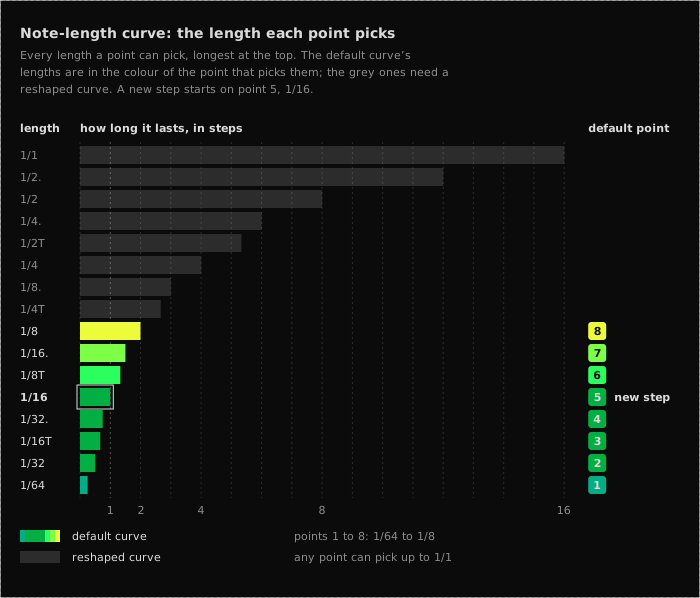
T is a triplet (two thirds of the plain length) and . is dotted (one and a
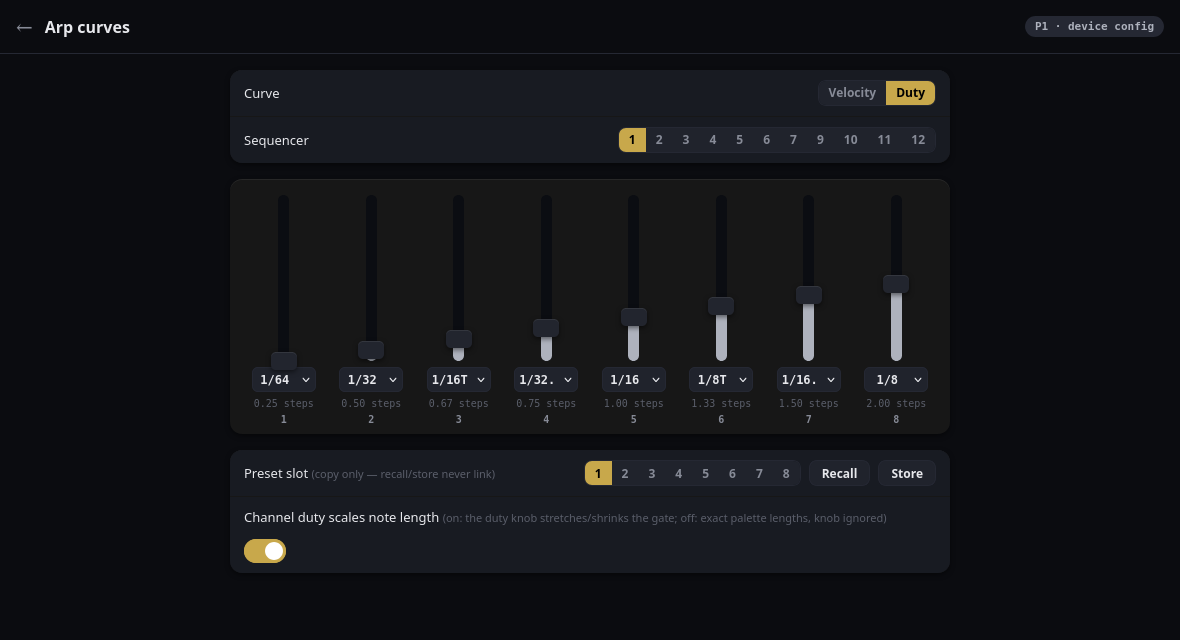
half times the plain length). In the editor each point has a dropdown of these
sixteen lengths, with the number of steps that length lasts underneath.
The names assume the Full clock division, where one step is a 16th, so 1/16
lasts exactly one step and anything longer runs into the next step. Lengths
follow the sequencer’s speed: at Half, one step is an 8th, and a 1/16 still
lasts one step, so a pattern keeps its feel when you change its speed (see
Clock division).
Eleven sequencers have a note-length curve: 1–7 and 9–12. The TR-8 does not, because drums are one-shots with nothing to sustain.
The duty arp doesn’t use this curve. It moves a step’s length along the same sixteen lengths, the same way on every sequencer; see Velocity and duty arps.
Channel duty scales note length
Each sequencer has a switch for whether its duty knob still acts on top of the curve:
- On (the default): the knob stretches and shrinks every length. At its centre detent it changes nothing; fully up it doubles them.
- Off: you get the exact lengths from the curve, and the knob is ignored for note length.
TB-03 slides
A TB-03 slides whenever a note lasts longer than one step. On the default curve that is points 6, 7 and 8, so a curve that puts long lengths on low points slides from steps that did not slide before. The duty arp counts too: it can push a short step past one step, or pull a long one back.
Presets
Each curve type has eight preset slots, shared by every sequencer. Store copies the sequencer’s curve into the selected slot, and Recall copies the slot into the sequencer. They are only copies: editing the curve afterwards leaves the preset alone, and editing the preset never changes a sequencer that recalled it.
Cross-references
- Step values: where per-step values are drawn, and how velocity and duty differ in the way they combine
- Velocity and duty arps: the velocity arp, which indexes the velocity curve, and the duty arp, which moves the step’s length instead
- Saving and loading sessions: what a session saves