
Drum views
This page covers the drum-specific surfaces: the DRUM_CYCLER destination picker and the TR-8 alt latch.
For the TR-8 accent, velocity arp, and autodrop UX, see Autodrops, Step values, and Velocity and duty arps.
Why the drum sequencers are different
To get the most nuanced control out of a drum machine we had to rethink the sequencer we had built for synths, so the drum sequencers work differently from the synth sequencers.
We have a TR-8 as our workhorse drum machine, alongside an Elektron (whose sequencer is a masterpiece and a large inspiration behind this one). The TR-8’s internal sequencer leaves quite a bit of the functionality of the machine out (“wot, no velocity, Roland?”), so we built this drum sequencer to make the most of its capabilities.
Two eight-row views, not one. A synth sequencer gives you eight rows; the TR-8 sequencer gives you two full grids: a main view for kick, snare and toms, and an alt view for rimshot, claps, hi-hats and cymbals: covering eleven drum voices, the busiest of them doubled onto two rows (see below). The UP/DOWN buttons on the launch control move you between them: the two views are neighbouring stops on the drum-cycler route, so UP walks forward through it and DOWN walks back: see DRUM_CYCLER below for what else is on that route.
There is no separate indicator telling you which of the two you are in: the grid is the indicator. Row buttons light by voice, so the main view shows kick, snare and toms whilst the alt view shows hats, cymbals, claps and rimshot, in different colours and a different order.
Two rows for some voices. Kick and snare on the main view, and rimshot and clap on the alt view, get two rows each rather than one. That gives those voices two separate velocity inputs, enabling you to add in ghost notes (the defaults put the second row at a lower velocity than the first). The clap and rimshot pair also sends two different MIDI notes, so you can play all of the sounds of the TR-8 (assuming you pick the correct instrument).
Velocity knobs. The TR-8’s velocity knobs sit on the middle knob row of the sequencers 9–15 bank: column 5 for the kick rows, column 6 for the rest of the main kit, and column 7 for the alt kit.
Voice colours. To avoid confusion, a TR-8 row that is playing normally lights its left-pad row button by voice rather than by row, so you can find a sound without counting: red for kick and hand claps, green for snare, hats and cymbals, blue for toms and rimshot. A muted row’s button is dark, and the other mute states apply their own feedback colours.
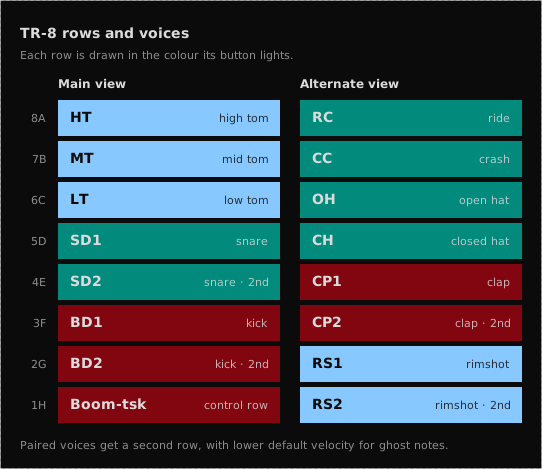
See the “Row LED colours” section of Mutes and row states for what those colours do when a row is muted, cued or droning.
Velocity arps instead of 16-step velocity. 16 step velocity sequencers are good, but they are a bit too precise for adding interest to drum patterns quickly, so the drum sequencers have a series of velocity arps instead (see Velocity and duty arps). The 16-step accent sequencer then scales all of the voices together, to add a groove across a beat independently of the per-voice modulation.
The bottom row is boom-tsk. On each TR-8 view the bottom row is a control slot rather than a normal pattern row. On unmuting it, the kit drops to a prefilled 4-4 kick and offbeat closed hat, and mutes every other TR-8 row that is playing, bringing the drums back to something square. See Boom-tsk.
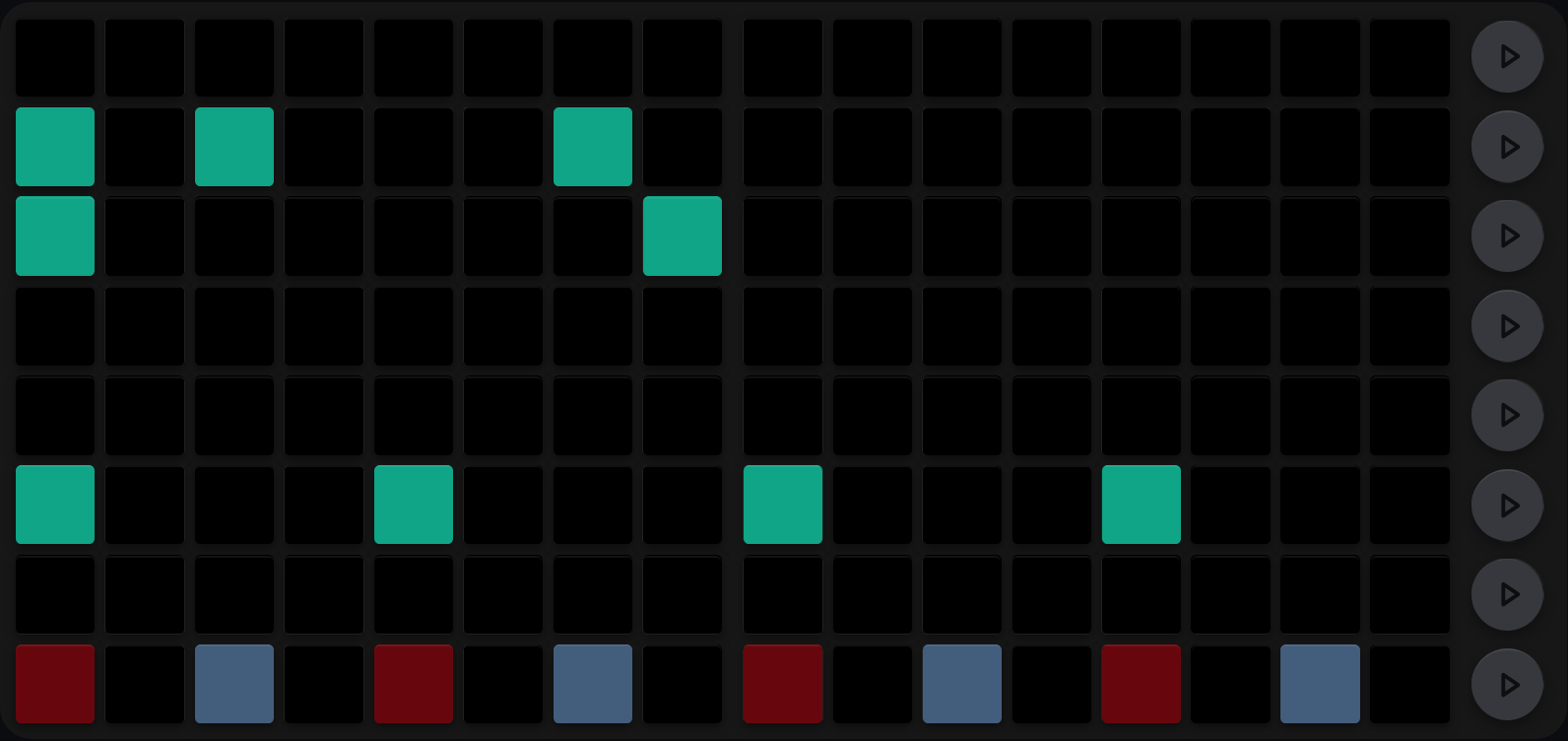
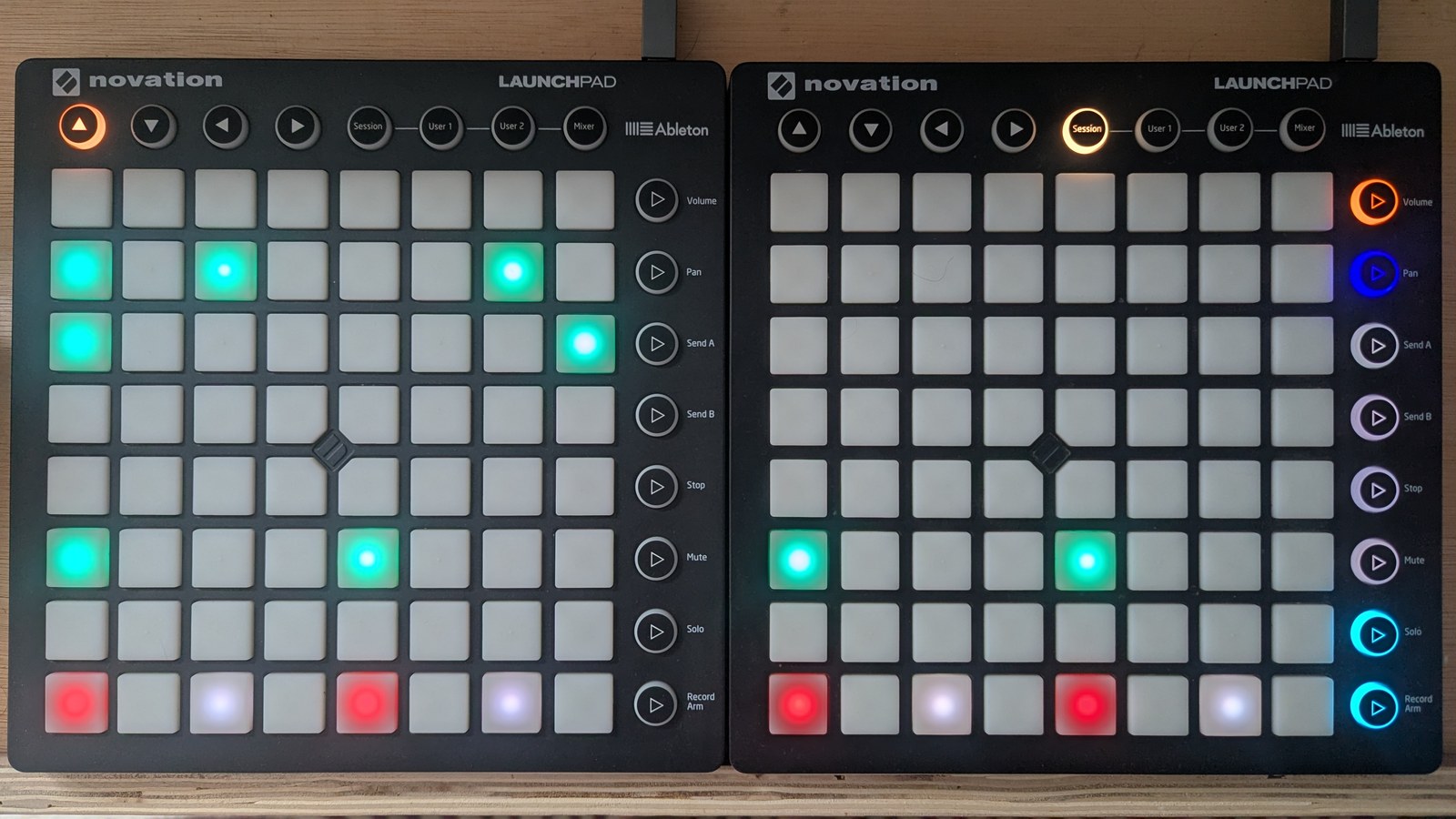
The TR-8 main view with its pattern rows muted. Kick sits on all four beats and a couple of tom rows carry five more trigs, but their row buttons stay dark until the rows are brought in. The bottom row shows boom-tsk’s fixed pattern whether or not it is engaged: kick on the beats and closed hat on the off-eighths, in dark red and slate while it is off, turning teal when you unmute it.
The alt view is the same grid pointed at the other eight voices, so everything you know about editing trigs still applies; only the row map changes.
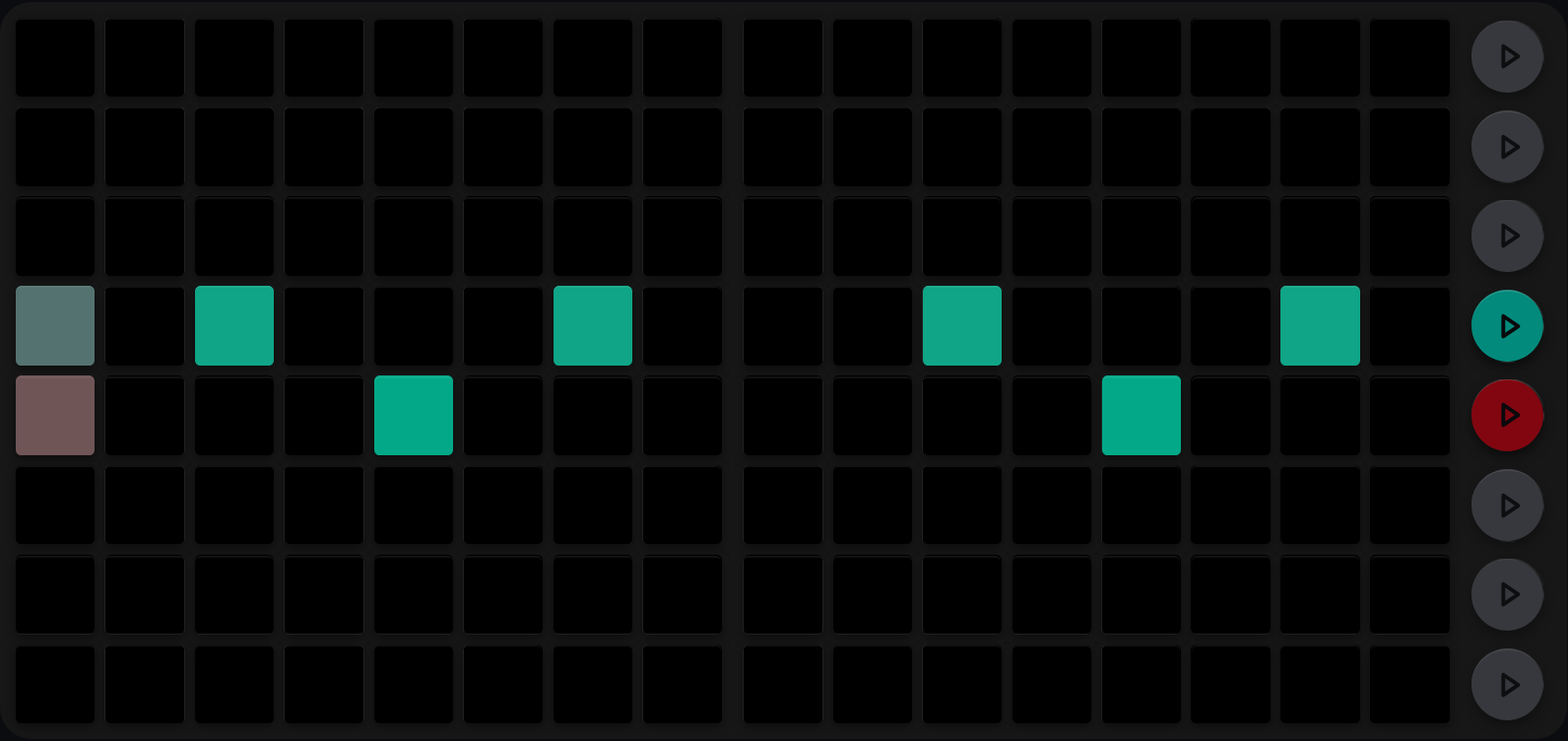
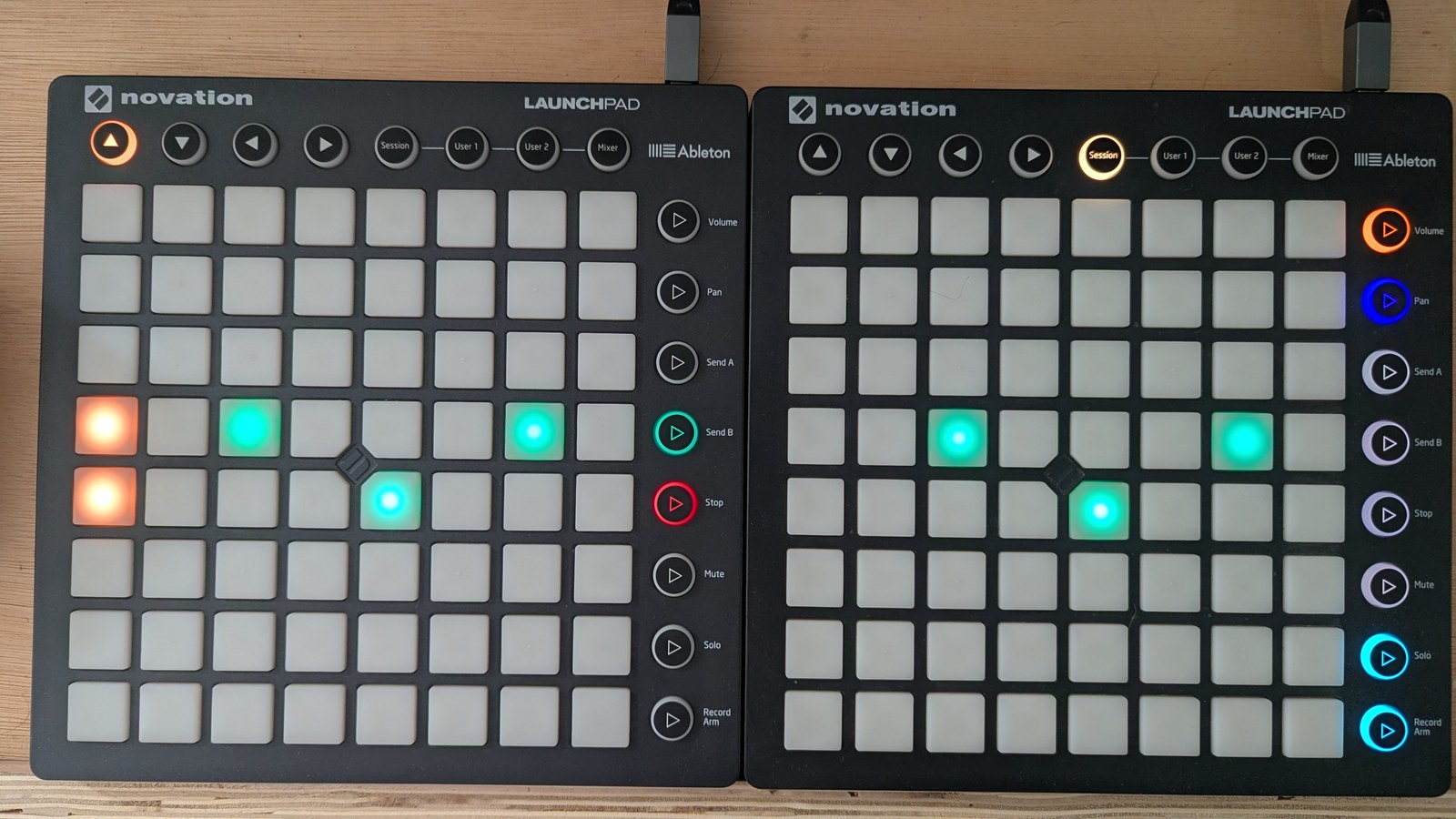
The alt kit doing the job it is usually given: closed hats on the off-eighths and a clap on 2 and 4. Counting up from the bottom the rows are rimshot 2, rimshot, clap 2, clap, closed hat, open hat, crash and ride, so the hats sit one row above the claps. The row buttons keep their voice colours, green for the hats and red for the claps, which is how you find a sound without counting rows. The two washed-out pads in column 1 are the playhead passing through those rows.
DRUM_CYCLER: choosing what the UP/DOWN buttons walk through
What it does
The TR-8’s UP/DOWN buttons step through the drum sequencers, and DRUM_CYCLER is where you say which ones are in the walk. There are six drum destinations: sequencers 13, 14 and 15, each in its normal and its alt configuration. And eight slots, one per pad. Turn a slot on and the cycler visits it; turn it off and the cycler skips it. Two slots are reserved for a future drum sequencer and do nothing.
That is the whole view. It holds no pattern and makes no sound; it only shapes the route the UP/DOWN buttons take.
What you see
The top row of the RHS LP, one pad per slot, counting left to right from column 1. The other 56 pads and the whole LHS LP stay dark.
| Slot | Pad | Destination | Lit colour |
|---|---|---|---|
| 0 | column 1 | TR-8, normal | green |
| 1 | column 2 | TR-8, alt | red |
| 2 | column 3 | seq 14, normal | yellow |
| 3 | column 4 | seq 14, alt | vivid orange |
| 4 | column 5 | seq 15, normal | blue |
| 5 | column 6 | seq 15, alt | violet |
| 6–7 | columns 7–8 | reserved | always dark |
Each destination gets its own colour so a normal slot and its alt are never confused. A slot that is switched off shows dim grey rather than going dark, so you can still see it is available; the two reserved slots are unlit, because there is nothing to switch on.
Edit gestures
Press a pad on the RHS top row to toggle that slot in or out of the walk. There are no modifiers. Either player can edit, and both see the same array. The walk is a property of the rig, not of a player.
Pressing a reserved pad does nothing.
Behaviour
Each slot holds a signed sequencer number: 13 means TR-8 normal,
-13 means TR-8 alt, and 0 means the slot is out of the walk. The
sign is how alt mode is carried, which is why every destination needs
its own slot rather than a separate alt toggle.
Each player has their own cursor. On each UP or DOWN press it walks forward (or backward) to the next slot that is switched on, wrapping at the end. So switching a slot off genuinely removes it from the route rather than leaving a dead step in it.
The cursor starts before the first slot and searches before it reads, so the first press of a session lands on slot 1 rather than sitting where it started. That is long-standing hardware behaviour and is deliberately preserved.
The view repaints itself at boot, and lives on the meta-sequencer (sequencer 16).
Cross-references
-
- Selecting sequencers and views
- what a cycle event does to the selected sequencer and view.
The TR-8 alt latch
Switching the TR-8 between its main and alt kit is not a view you visit; it is a latch, set as a side effect of the UP/DOWN walk described above. When the cycler lands on a slot holding a negative number, the latch goes on and the sequencer shows its alt kit; land on a positive one and it goes off.
Nothing else moves it. Pressing top-row sequencer buttons or column-9 view buttons never changes the latch, and it survives moving between views. Only the cycler and a patch reset affect it.
The latch swings the whole TR-8 surface between the main kit and the alt kit at once, so trigs, row mutes, velocity arps, accents and CC arps all follow it together. It is held per player, so the two of you can be on different kits at once.
Cross-references
-
- Selecting sequencers and views
- the UP/DOWN walk and what else a cycle event changes.
- Autodrops: TR-8 sequencer autodrops key off the latch too.
- Mutes and row states: row mute states, which are held per kit.
Quick reference
| Surface | Sequencer | What it does |
|---|---|---|
| Drum cycler | 16 | Picks which drum destinations UP/DOWN walks through |
| TR-8 alt latch | 13 (not a view) | Switches the TR-8 surface between the main and alt kit |