
Clock
This page covers the views and signals that govern when MSEQ steps fire:
- Per-sequencer clock division (CLOCK_DIV view)
- Per-sequencer swing (SWING view)
- The SLEEP view (LP power-saver)
- MIDI clock and transport from Ableton (cross-link to Ableton setup)
- A brief note on the boot/init-sequence side that is visible to the player
It does not cover BPM acquisition or M4L routing: see Ableton setup.
Clock division
What it does
Each sequencer has its own clock divider, which decides how long one step lasts. Nine divisions are available, from six times the length of a 1/16 down to two thirds of one:
| Division | How long one step lasts |
|---|---|
| Dotted quarter | 6 × a 1/16 |
| Dotted half | 3 × a 1/16 |
| Dotted full | 1.5 × a 1/16 |
| Quarter | 4 × a 1/16 |
| Half | 2 × a 1/16 |
| Full | one 1/16 (the default) |
| Triplet quarter | 8/3 × a 1/16 |
| Triplet half | 4/3 × a 1/16 |
| Triplet full | 2/3 × a 1/16 |
Note lengths follow the step. A duty value, a legato note and a sustain all measure in this sequencer’s steps, so slowing a sequencer to Half doubles every note length with it: a staccato line stays staccato, and a legato note still reaches the next trig.
What you see
A single 8×8 LP layout with one column per sequencer split across the LPs: LHS cols 1–7 = sequencers 1–7, RHS cols 1–7 = sequencers 9–15. Cols 8 on each side are reserved (sequencer 8 / sequencer 16, no clock division) and show legend colours only.
Within each column the rows are split into two stacks:
- Rows 8, 7, 6 set the speed: FULL / HALF / QUARTER.
- Rows 3, 2, 1 set the division: TRIPLETS / SIXTEENTHS / DOTTED.
- Rows 4, 5: always dark.
The currently-active speed and division each light up in that sequencer’s sequencer colour. When the target differs from the selected value (a press has been registered but has not taken effect yet), the active cell blinks until the swap happens.
Edit gestures
- LP press at row = (speed or division), col = sequencer sets that sequencer’s new division. Either player’s LHS can edit sequencers 1–7; either player’s RHS can edit sequencers 9–15.
- Pressing the already-active cell is a no-op.
- Col 8 (reserved sequencer) and rows 4–5 (blank) are ignored.
- LC has no per-row modifiers in this view.
- SHIFT + MUTE / SHIFT + SOLO are no-ops on CLOCK_DIV. The view is explicitly excluded from reset and randomise: see Reset and randomise.
Behaviour
Your press does not take effect at once. The cell blinks to show a change is pending, and MSEQ waits for the old division and the new one to line up on the same step before it swaps. That is what stops the step position jumping when the division changes.
It is not bar-quantised, so how long the blink lasts depends on which two divisions are involved: neighbouring divisions line up quickly, distant ones can take several bars. If you want a change on the beat, make it early. Sequencers 8 and 16 have no divider.
Every sequencer starts at Full, one step per 1/16, unless a session says otherwise.
Cross-references
- BPM source and MIDI clock entry: Ableton setup
- Swing delay (uses the same step-duration multiplier): see Swing below
- Excluded from reset/randomise: Reset and randomise
Swing
What it does
Swing delays every second step of a sequencer’s pattern by a fraction of one step, producing a shuffle feel. Counting the grid the way the trig view labels it, steps 1–16, the delayed ones are the even-numbered steps: 2, 4, 6 and so on, the off-beats. Each sequencer has its own swing setting, and the tempo and that sequencer’s clock division together decide how long the delay actually is.
Which steps swing is a single 16-step pattern shared by every sequencer, and no control edits it, on the hardware or in the webapp. A new session starts with the even-numbered steps swung, as described above, and save and load carry the pattern with the session.
Two controls drive it:
- A coarse level, 0 to 7, set from the grid.
- A fine offset, set from the LaunchControl knob, which slides between two adjacent coarse levels.
Both at zero is fully straight, which is also what reset gives you (see Reset and randomise). Each coarse level delays the swung steps by this much of one step:
| Coarse level | Fraction of one step |
|---|---|
| 0 | 0 |
| 1 | 1/16 |
| 2 | 1/12 |
| 3 | 1/8 |
| 4 | 1/4 |
| 5 | 1/3 |
| 6 | 3/8 |
| 7 | 1/2 |
The fine knob slides evenly towards the next level down the list, and a little past level 7, but never far enough for a swung step to reach the one after it.
What you see
The view displays each sequencer’s current swing level on the selected player’s LP. Pressing a row writes a coarse level; the cell stays lit as a position cursor for that sequencer.
One column per sequencer, 14 of them: LHS columns 1–7 are sequencers 1–7 and RHS columns 1–7 are sequencers 9–15. Column 8 of each LP stays blank, because it would land on s8 and s16, the LC page sequencers, which have no swing of their own. The lit cell’s colour reports the fine offset on top of the coarse level: spring green for fine 0, then three progressively paler blues as the fine knob climbs (1–42, 43–84, 85 and over).
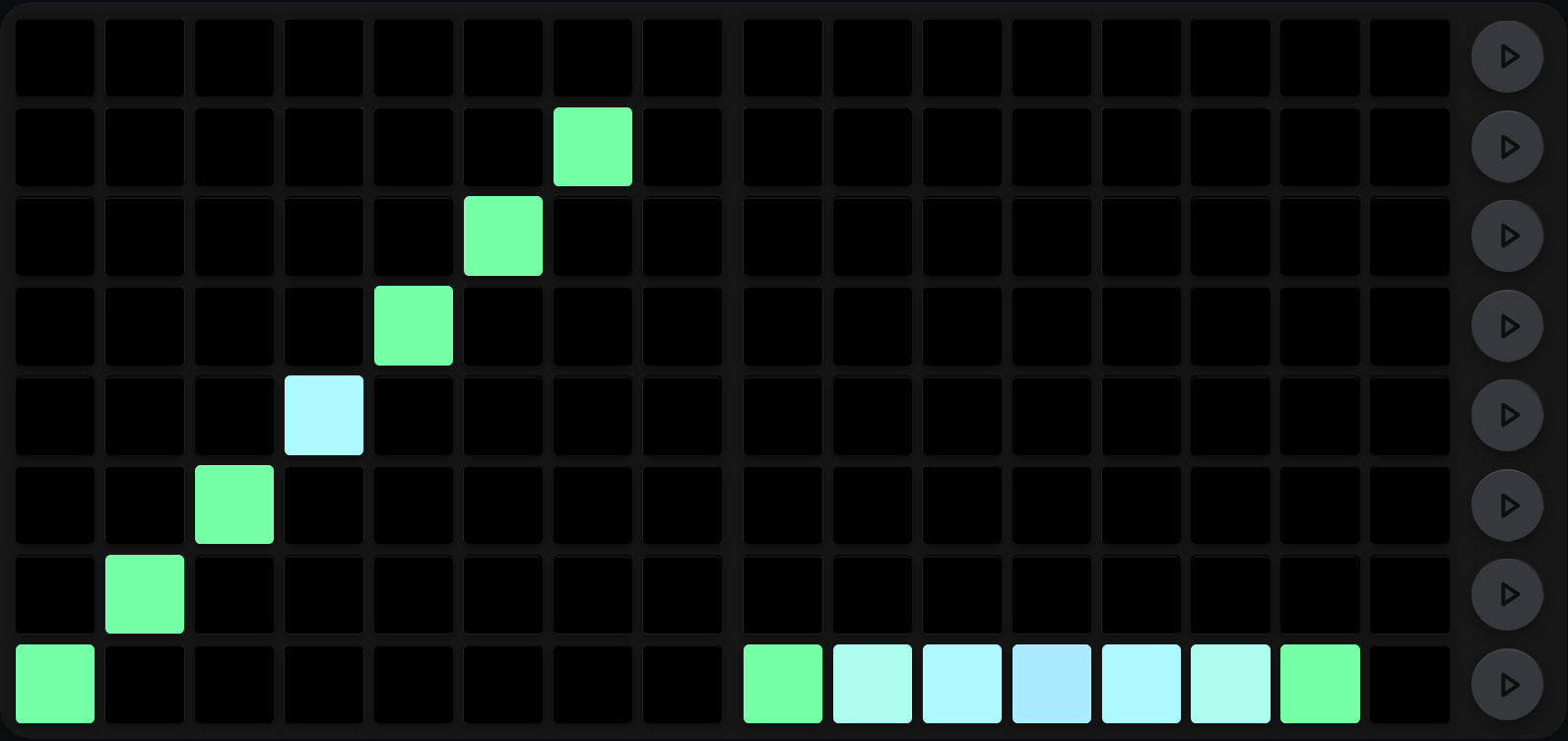
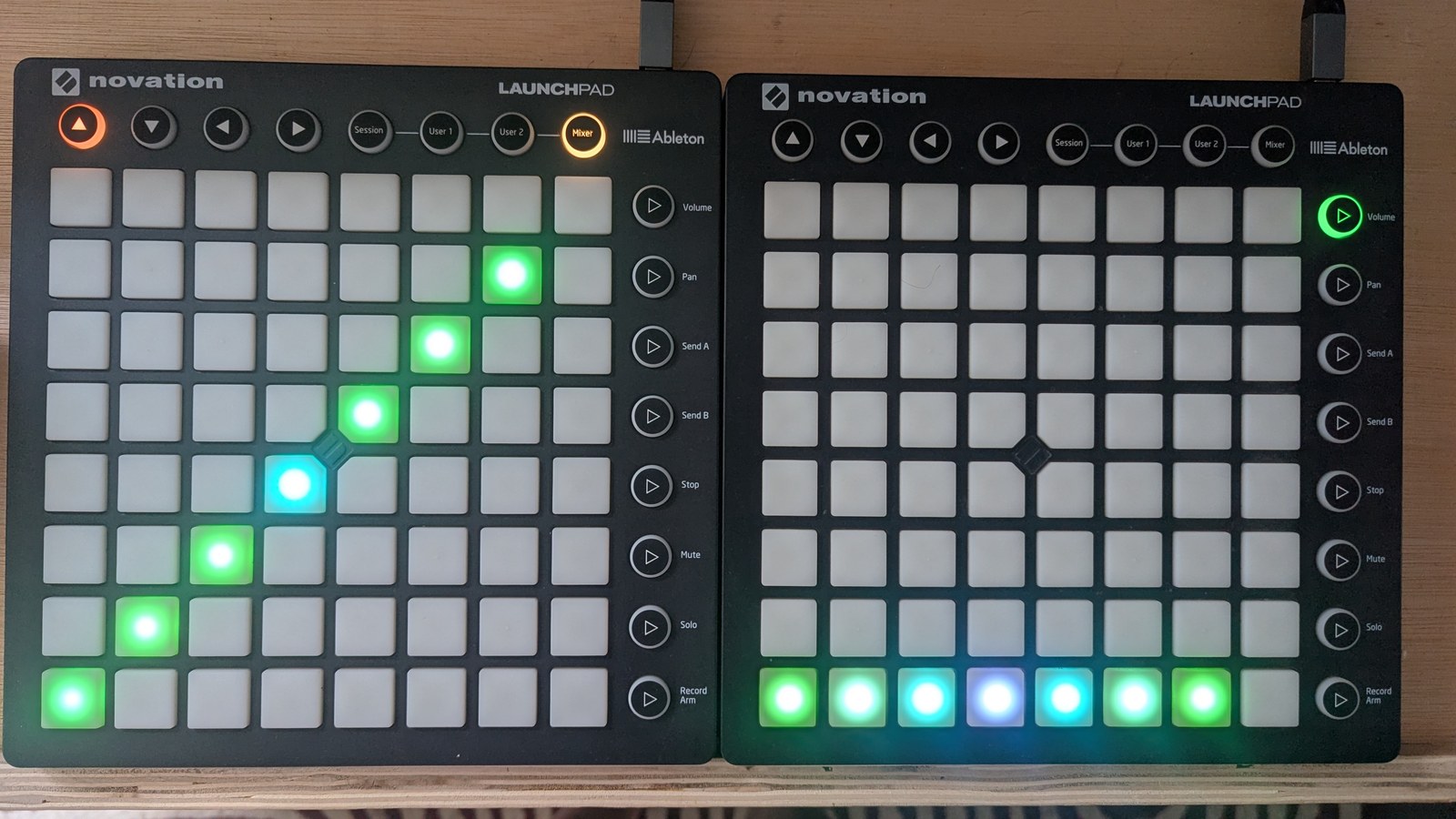
Swing has two controls and this grid shows you both at once. Vertical position is the coarse level: sequencers 1 to 7 climb a level per column, pushing the swung step later by 0, 1/16, 1/12, 1/8, 1/4, 1/3 and 3/8 of a step in turn. Colour is the fine offset from the knob, which interpolates towards the next coarse level: spring green is none, then pale mint, pale cyan and pale blue as it climbs. Sequencers 9 to 15 all sit on coarse 0 and differ only in colour, fanning out from no fine offset to the top of the range and back down again.
Sequencer 4 is the one to look at, because it is both raised and pale: coarse 3 with fine on top, so its delay lands somewhere between 1/8 and 1/4 of a step rather than on either. That is why there are two controls. Coarse gets you to the feel you want and fine lets you sit just off it. (Columns 8 and 16 are blank because those two sequencers have no swing of their own.)
Edit gestures
- LP press sets the coarse level: the column is the sequencer, the row is the level. It also points the fine-swing knob at that sequencer.
-
LC fine-swing knob (bottom-row knob 8) sets the fine offset for the sequencer that player last targeted. On entry to the SWING view the target seeds from the last non-blank sequencer that player selected before moving to s8/s16; if no such target is known yet, the knob is a no-op until they press a swing-grid cell. Outside the SWING view it writes the fine offset of the sequencer that player is currently on. The knob interpolates between the coarse levels, so it is how you dial in a feel that sits between two pads.
The knob belongs to the player, not to the template, so either of you can be on any user template (or on the webapp’s XL) and still edit your own sequencer. The knob’s LED ring lights with the value it is about to change, so you can see where you are before you turn it.
- SHIFT + MUTE (reset) returns the pressed sequencer to fully straight, coarse and fine together. Others are untouched. See Reset and randomise.
- SHIFT + SOLO (randomise) gives the pressed sequencer a random coarse swing and leaves your fine adjustment alone. LHS col 9 does nothing here.
Behaviour
The swung steps are held back by the swung amount before their notes fire. The delay is capped just short of a full step, so a swung step can never run past the step that follows it, however extreme the setting.
If BPM is unavailable, the engine falls back to a small fixed delay
proportional to the coarse level (max(0, level) ms), so the patch
still runs in development without an Ableton clock.
Cross-references
- BPM source: Ableton setup
- Reset behaviour (per-sequencer only): Reset and randomise
- Step-duration shared with clock division: see Clock Division above
SLEEP
What it does
SLEEP is a display-only view that puts the Launchpad into a low-LED state without disturbing the engine. It is used to dim the rig between sets, or to silence the LP’s bright glow during recording. No musical state is touched.
Press the button in the top left to turn all of the lights off, and change sequencers using the top buttons to turn it back on.
What you see
The grid is held mostly dark. The only lit cells are the column-9 view button itself and the toggle pad in the top-left corner of the grid (row 8, column 1). Pressing that pad turns the Launchpad lights off, and pressing it again brings them back.
Edit gestures
SLEEP has no edit gestures of its own. You enter and leave it through the normal column-9 view-selection path (see Selecting sequencers and views).
- SHIFT + MUTE / SHIFT + SOLO are no-ops. SLEEP holds no musical state (see Reset and randomise).
Behaviour
Selecting SLEEP suppresses LED redraws on that player’s Launchpads. Selecting any other view restores them. The engine (sequencers, MIDI output, swing, clock division) keeps running unchanged.
MIDI clock and transport
MSEQ does not generate its own clock in production. It receives MIDI real-time clock at 24 PPQN from Ableton via the PiSound MIDI input, and that drives every sequencer’s step counter. Transport (start, stop and continue) follows Ableton’s transport state. For port selection and the BPM detector, see Ableton setup.
The clock division and swing views above only decide how MSEQ interprets that incoming clock. They do not produce or consume MIDI clock messages directly.
How MSEQ follows the clock
MIDI clock sends 24 F8 ticks per quarter note, so the nominal gap between
ticks is 2500 / BPM milliseconds. In theory those ticks arrive evenly. In
practice they pass through a DAW, an operating system, USB MIDI and Pure
Data’s scheduler. One may arrive early, the next late, and two may be
delivered together with a measured gap of zero. A short scheduling stall can
be followed by a burst of catch-up ticks.
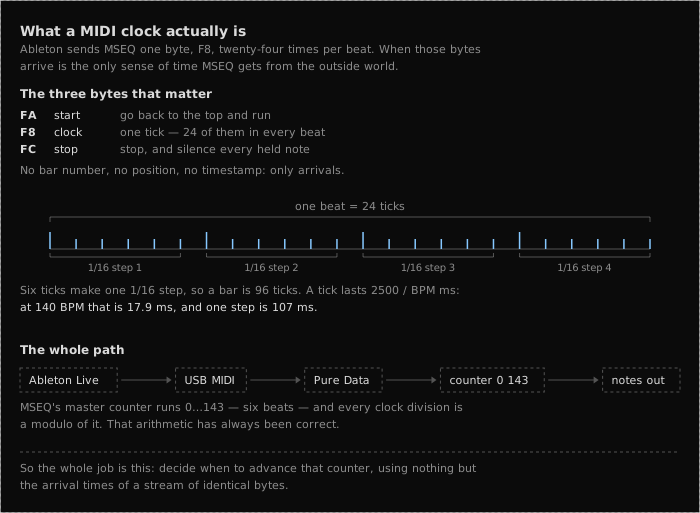
MSEQ does not pass each unstable incoming tick straight through to the sequencer. It treats MIDI clock as a reference and runs its own 24-PPQN output flywheel. Every real input tick counts, batched zero-gap ticks and implausible-looking outliers included, because discarding one would permanently put the input and output tick counts a step apart.
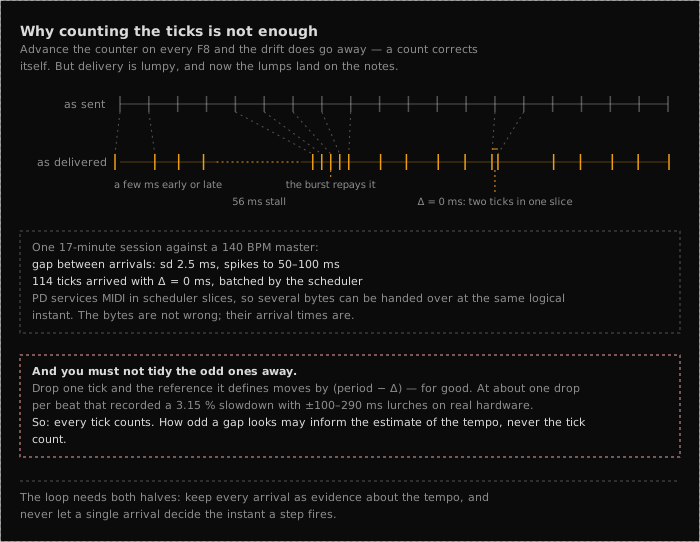
The flywheel needs both a rate and a phase target. Its preferred rate comes from the fractional BPM the Ableton device sends, which gives an exact nominal period without having to infer the tempo from every noisy interval. If no BPM value is available, MSEQ takes the total elapsed time across a two-beat window and divides by the number of ticks, so an early tick followed by a late one tends to cancel out rather than distort the tempo. For phase, it compares the same-numbered input and output ticks and trims the next output wait by a fraction of the error.
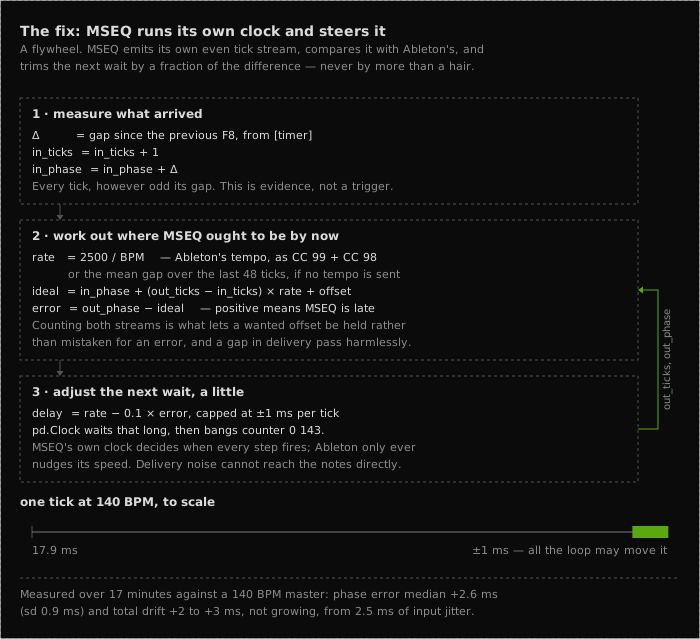
During normal running that correction is capped at a millisecond per tick, so the clock bends gently back towards the incoming phase instead of copying every arrival wobble into the MIDI output.
That gentle correction is for delivery noise. The more serious cases are handled differently:
- When playback starts there is no phase history to follow, so the first real tick gets a one-shot snap and the opening downbeat does not spend several beats drifting into place.
- A USB or scheduler stall can make several ticks arrive late and then in a burst. MSEQ coasts at the last trusted rate while the clock is missing and lets the phase target absorb the burst. (The silence watchdog still stops held notes if the clock really does disappear.)
- A transport jump or a tempo change during a dropout leaves a large error that persists across several ticks. MSEQ resynchronises once rather than taking a bar to lean back into place.
- The BPM reading travels by a separate path, so it can be stale or wrong. MSEQ compares it with the measured clock and falls back to the measured rate when the two disagree for long enough.
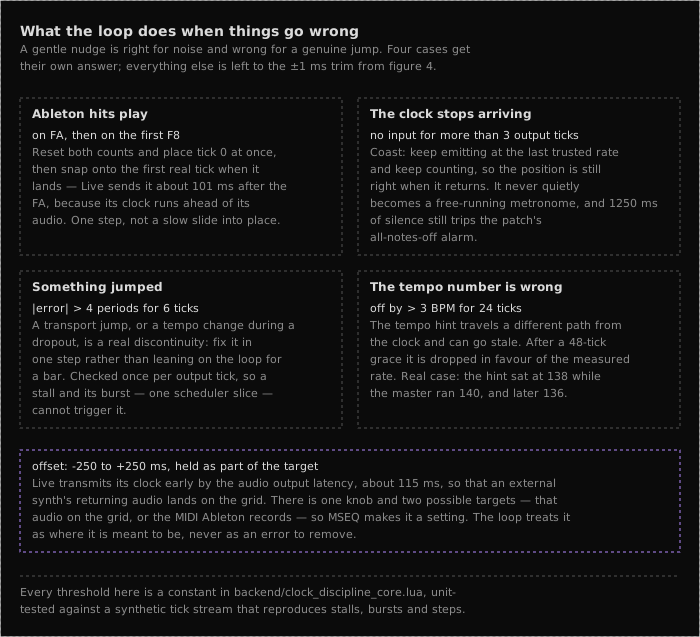
An offset is not a failure at all. Live may send its clock early so that returning audio lands on the beat, and MSEQ holds that offset as part of the target instead of correcting it away. If what you hear sits ahead of Live’s grid, the MIDI Clock Sync Delay slider is the place to fix it (see Ableton setup).
Cross-references
- Ableton setup: MIDI clock source, BPM detector, M4L routers, LC user templates
- Reset and randomise: per-view reset/randomise behaviour, including the clock division, swing and sleep views
-
- Selecting sequencers and views
- how players land on these views in the first place
- Saving and loading sessions: divisions and swing are saved with the session